• Need a Uptimerobot underline
    alternative?

    Try Pulsetic. More features, more peace of mind - for the same price.

    Learn why...

    No credit
    card required.

  • Looking for Uptimerobot alternative?

Pulsetic vs Uptimerobot: the breakdown

It happens: websites go down. If your customers don’t know about it, that’s bad news for your brand reputation. And if you don’t know about it, it’s even worse.

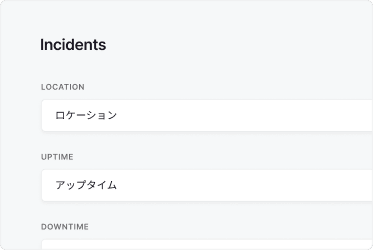
Pulsetic monitors your uptime from 15 locations around the world, giving you and your customers beautiful, real-time updates in every language.

But there’s another reason people looking for an Uptimerobot alternative come to Pulsetic: the functionality you get for your money.

Let’s compare the two.

  • Beautiful status badges

    Beautiful status badges

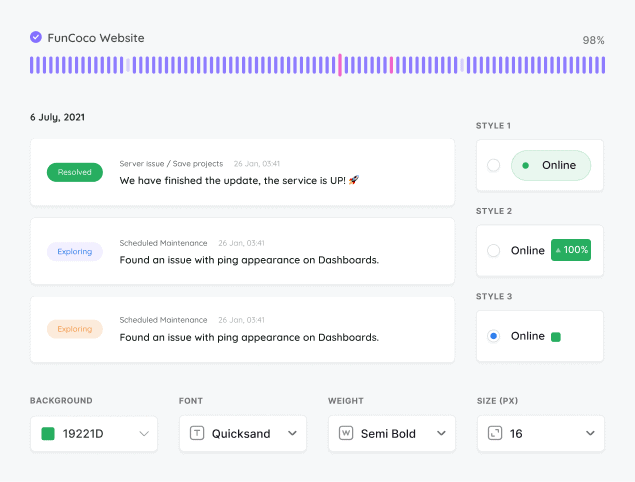
    Unlike Uptimerobot, Pulsetic gives you a white labeled badge showing your service availability in real time - on any page you like. You can customize it to your brand in minutes: colors, fonts, symbols, text, and backgrounds. And if you need more freedom to make it yours, you can use Custom CSS instead.

  • Beautiful status badges

    30 second uptime checks 

    Uptimerobot checks things are OK every minute, or every five minutes, depending which plan you choose. With Pulsetic, you can know about an incident in half the time: within 30 seconds. If you want to, though, you can also space out the intervals between checks.

  • Support for every language 

    Support for every language

    Uptimerobot works in English - and only English. The world’s 6 billion people who don’t speak English need an Uptimerobot alternative. Pulsetic, on the other hand, supports every language on earth: from Spanish to Swahili. So wherever your customers are, you can let them know what’s happening.

  • We have been using UptimeRobot for some years but by transferring to Pulsetic we both got a much better service and solved all problems with constantly false positive alarms at UptimeRobot. Pulsetic also has a much better dashboard and more settings. They have a good support that responses quickly and they have a great dev team which we missed very much at UptimeRobot. So, we are very happy about the transfer, and we should have done this a long time ago.

  • Review person

    Jens Kirk

    Web Developer at webkonsulenterne

Pricing: Pulsetic vs Uptimerobot

  • Free plans

    Uptimerobot’s free plan matches Pulsetic’s for check times. But Pulsetic’s also gives you extra functionality that you have to pay for with Uptimerobot. You’ll get more integrations, SSL monitoring and unlimited, full-featured status pages, as well as custom domains. Uptimerobot’s free plan, on the other hand, gives you just one status page.

  • Solo plans

    On the cheapest paid plan, Uptimerobot gives you 3 status pages. With Pulsetic, you can create as many as you need. Pulsetic’s alternative to Uptimerobot also gives you complete customization for your status page and badges, as well as notifications for up to 1,000 subscribers on the solo plan.

  • Team plans

    If you need to know what’s happening by SMS or voice call, Pulsetic is the best Uptimerobot alternative. Pulsetic’s Team plan gives you 100 credits for SMS and voice call alerts, compared with 30 on Uptimerobot’s similarly priced plan. Pulsetic Team also lets you work with up to 2 teammates.

Feature comparison

PulseticPulsetic

UptimeRobot

Free plan / trial

Free Plan

Free Plan (non-commercial only)

Price (USD/mo)

$9

$8

Monitoring

Check time

30 sec

60 sec

Choice of regional data centers

SSL monitoring

Paid plans

Keyword monitoring

Ping / ICMP monitoring

Port monitoring

TCP monitoring

Domain monitoring

Paid plans

Cron / heartbeat monitoring

Custom HTTP requests

Customized responses

API

MCP server

n8n integration

Monitoring data retention

Up to 5 yr

24 mo

Status Pages

Incident updates

Status updates for subscribers via email

Maintenance windows

Status badges

Customized domain

Customized colors

Customized logo

Remove branding

Customized status page layout

CSS customization

Custom email sender & templates

AI writing assistant

Page translations

Password-protected status page

Notifications

Email alerts

SMS alerts

Phone call alerts

Slack alerts

MS teams alerts

Discord alerts

Telegram alerts

Mattermost alerts

Webhooks alerts

Zapier alerts

Twilio alerts

Datadog integration

Integration with SIGNL4

Analytics

See response times

Response time by location

Custom date range reports

Scheduled email reports

Security

Two-factor authentication

Single Sign-On (SAML)

Role-based access

Support

Chat

Human Support

AI Support

Helpdesk Articles

Email Support

Comparison based on publicly available information as of July 2026. Features and pricing change frequently, so please verify current details on each provider’s website.

Trusted by teams at companies around the world

And there’s more in Pulsetic’s free plan…

  • Find why your website is slow

    See where your website is loading slowly

    We’ll check your website response times from different locations around the world, so you know if there’s an issue in a particular region.

  • Find why your website is slow

    Alerts wherever you want them

    Pulsetic lets you know the moment your website is down, through Slack, Telegram groups, Webhooks, email, SMS or voice call.

  • Find why your website is slow

    Never let your SSL expire again

    We’ll let you know when it’s time to update your SSL certificate - so you can renew it before customers are seeing error messages.

Frequently asked questions

  • Is UptimeRobot really free?

    Yes and no. The free plan gives you 50 monitors and 5-minute checks. The catch arrived with a late-2024 terms change: it now covers personal, non-commercial use only. Got a site that makes money, serves clients, or belongs to a business? That means a paid plan. Pulsetic's free plan permits commercial use, so a business website can stay on it without an upgrade.

  • Why is Pulsetic a good alternative to UptimeRobot?

    It was designed for teams that care about the monitoring and the status page their customers end up seeing. Checks run every 30 seconds across HTTP(S), SSL, keyword, ping, port, TCP, domain, and cron or heartbeat monitoring. Status pages are fully customizable and come with subscriber notifications and status badges. Alerts reach you through Slack, Microsoft Teams, Discord, Telegram, SMS, voice call, and webhooks.

  • How does Pulsetic's pricing compare to UptimeRobot?

    Pulsetic's paid plans begin at $9 per month. UptimeRobot's entry paid plan sits close by, around $8 per month. For roughly the same outlay, Pulsetic includes extras UptimeRobot keeps for its pricier tiers: unlimited status pages, custom domains, and a longer list of alert integrations. Each one has a free plan too, though only Pulsetic's works for commercial projects.

  • How do the check intervals compare between UptimeRobot and Pulsetic?

    On UptimeRobot's free plan, checks land every 5 minutes. Standard paid plans drop that to every 60 seconds, and you only reach 30-second checks on the top Enterprise tier. Pulsetic checks every 30 seconds across the board, which cuts the time it takes to spot downtime by about half. Want a wider gap between checks instead? You can set that too.

  • How do I switch from UptimeRobot to Pulsetic?

    There's no one-click export from UptimeRobot. Most people just re-add their URLs in the new tool, and for a typical set of websites that takes well under an hour. The Pulsetic side is short: create your monitors, pick a check interval, connect your alert channels, publish a status page. Give it a moment to confirm everything reports correctly, then close your old account.

  • Does Pulsetic offer better status pages than UptimeRobot?

    In Pulsetic, status pages are part of the core product, not a bolt-on. Make as many as you need, style them fully, point them at a custom domain, drop in status badges, and let subscribers hear about an incident automatically. UptimeRobot's free plan caps you at one status page. Its cheapest paid plan stretches that to three, and the customization is more limited.

  • Can I use UptimeRobot's free plan for a business website?

    No. The free plan is for personal, non-commercial use, so business and revenue-generating sites are meant to be on a paid plan. Open-source, educational, and nonprofit projects usually get a pass. If a free plan that covers commercial monitoring is what you're after, Pulsetic's free tier handles it.

  • Where does Pulsetic check my website from?

    Checks come from data centers spread across the world, and you pick which regions to monitor from. That lets you verify your site is reachable for the audiences you care about and catch outages that only hit one region. UptimeRobot doesn't let you choose your own check locations, so when geographic coverage matters, Pulsetic is the better fit.