• Need a Better Stack underline
    alternative?

    Try Pulsetic. Get website monitoring & beautiful status pages for half the price.

    Learn why...

    No credit
    card required.

  • Looking for Better Stack alternative?

Pulsetic vs Better Stack: the breakdown

Imagine if your services went offline overnight, and you didn’t know about it. While you were asleep, a day went by for your customers on the other side of the world. They couldn’t access your website. They didn’t know why.

Pulsetic solves that problem for you. It monitors your uptime from up to 15 locations around the world, giving you and your customers beautiful, live status updates in the language your customers read.

But there’s another reason people looking for a Better Stack alternative come to Pulsetic: the functionality you get for your money.

Let’s compare the two.

  • Beautiful status badges

    Beautiful status badges

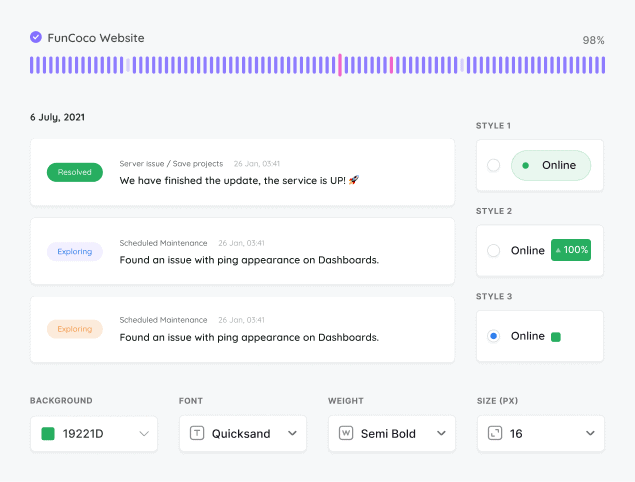
    Unlike Better Stack, Pulsetic gives you a status badge showing your live service status on any page you like, from the $9 Solo plan. You can customize it to your brand in minutes: colors, fonts, symbols, text, and backgrounds. And if you need more freedom to make it yours, you can use Custom CSS instead.

  • Beautiful status badges

    30 second uptime checks 

    On their higher plans, Better Stack and Pulsetic both check things are OK every 30 seconds (for Pulsetic, that’s the Team plan). If you want to, though, you can also space out the intervals between checks with Pulsetic. And if you’re constrained by budgets, Pulsetic will run checks every five minutes, completely free.

  • Three status pages, free

    Three status pages, free

    Better Stack’s free plan includes one status page and charges $15 a month for each extra. Pulsetic’s free plan includes three, each on a domain you own. From the $9 Solo plan, you can publish as many as you need.

  • "Using Pulsetic is a big win for us! Our dev team can now deliver faster, with zero time spent monitoring our website uptime. Plus the interface and analytics are great."

  • Review person

    Razvan Popescu

    Head of Marketing at AbstractAPI

Pricing: Pulsetic vs Better Stack

  • Free plans

    Better Stack’s free plan and Pulsetic’s both give you up to 10 monitors. Where they part is the status page: Better Stack includes one and charges $15 a month for each extra, where Pulsetic’s free plan includes three, each on a domain you own.
    And unlike Better Stack, Pulsetic also gives you SSL monitoring, completely for free.

  • Team plans

    Pulsetic’s Team plan monitors 50 services for $19/month. Better Stack includes only 10 monitors on its base plan, so reaching 50 means adding a $25/month monitor pack on top, which pushes it past $50/month. Pulsetic’s alternative to Better Stack also gives you status page and badge customization from the Solo plan, and Team adds white labeling and notifies up to 5,000 subscribers.

  • Organization plans

    If you need to look after lots of websites or services, Pulsetic’s Organization plan ($49/month) gives you 300 monitors. On Better Stack, monitors come in $25/month packs of 50 on top of the base plan, so even 100 monitors runs to around $80/month. With Pulsetic you get roughly three times the monitors for less.

Feature comparison

PulseticPulsetic

Better Stack

Free plan / trial

Free Plan

Free Plan

Price (USD/mo)

$9

$25 per 50 monitors

Monitoring

Check time

30 sec (Team plan)

30 sec

Real User Monitoring (RUM)

Choice of regional data centers

SSL monitoring

Keyword monitoring

Ping / ICMP monitoring

Port monitoring

TCP monitoring

Domain monitoring

Cron / heartbeat monitoring

Custom HTTP requests

Customized responses

Downtime screenshots

Team plan and up

Chart annotations

✕

API

Solo plan and up

Built-in AI assistant (chat)

Solo plan and up

MCP server

Solo plan and up

n8n integration

Solo plan and up

✕

Cloudflare IP allowlisting

Manual

Monitoring data retention

3 mo to 5 yr by plan

13 mo

Status Pages

Incident updates

Solo plan and up

Status updates for subscribers via email

Solo plan and up

Maintenance windows

Solo plan and up

Status badges

Solo plan and up

Customized domain

Customized colors

Solo plan and up

Customized logo

Solo plan and up

Remove branding

Team plan and up

Customized status page layout

Solo plan and up

✕

CSS customization

Solo plan and up

Custom email sender & templates

Solo plan and up

AI writing assistant

Solo plan and up

✕

Page translations

Password-protected status page

Solo plan and up

SSO-protected status page

Organization plan

Notifications

Email alerts

SMS alerts

Solo plan and up

Phone call alerts

Solo plan and up

WhatsApp alerts

Solo plan and up

✕

Slack alerts

Solo plan and up

MS teams alerts

Solo plan and up

Discord alerts

Solo plan and up

✕

Telegram alerts

Solo plan and up

✕

Mattermost alerts

Solo plan and up

✕

Webhooks alerts

Zapier alerts

Solo plan and up

Twilio alerts

Solo plan and up

✕

Datadog integration

Solo plan and up

Integration with SIGNL4

Solo plan and up

Analytics

See response times

Response time by location

✕

Custom date range reports

Scheduled email reports

✕

Web Analytics & RUM

Cookieless tracking

✕

Core Web Vitals (field data)

Load time percentiles (p50/p75/p95)

Not documented

JS error tracking

Realtime visitors

Traffic breakdowns (pages, geo, devices)

Goals / custom events

✕

Analytics data retention

3 mo to 5 yr by plan

3-90 days by type

Self-hostable

✕

✕

Security

Two-factor authentication

Single Sign-On (SAML)

Organization plan

Role-based access

Team plan and up

Support

Chat

✕

Human Support

AI Support

✕

Helpdesk Articles

Email Support

Comparison based on publicly available information as of September 2026. Features and pricing change frequently, so please verify current details on each provider’s website.

Trusted by teams at companies around the world

  • image/svg+xml
  • image/svg+xml Mercedes-Benz logo
  • image/svg+xml
  • image/svg+xml

And Pulsetic’s free plan gives you even more…

  • Find why your website is slow

    See where your website is loading slowly

    We’ll check your website’s response times from different locations around the world, so you know if there’s an issue in a particular region.

  • Find why your website is slow

    Alerts wherever you want them

    When your website fails a check and a second location confirms it, Pulsetic alerts you by email or webhook. Slack, Telegram, SMS, WhatsApp and voice-call alerts start on the $9 Solo plan.

  • Find why your website is slow

    Never let your SSL expire again

    We’ll let you know when it’s time to update your SSL certificate, so you can renew it before customers see error messages.

Frequently asked questions

  • Is Better Stack free?

    Better Stack has a free plan that includes around 10 monitors, one status page, and email and Slack alerts, with checks running every 3 minutes. Pulsetic also offers a free plan, and it adds SSL monitoring at no cost, plus three status pages on a domain you own. Slack and other chat alerts start on the $9 Solo plan. Better Stack's free checks run more often than Pulsetic's 5-minute ones, but for status pages Pulsetic's free tier goes further: three instead of one.

  • How much does Better Stack cost compared to Pulsetic?

    Better Stack's paid plans start at roughly $30 per month, and costs can climb quickly because monitoring, heartbeats, extra status pages, logs, and incident management are billed as separate modules and add-ons. Pulsetic starts at $9 per month and keeps uptime monitoring and status pages together in one simple plan. For teams that just need reliable monitoring and a status page, Pulsetic is usually the cheaper and more predictable choice.

  • Why is Pulsetic a good Better Stack alternative?

    Better Stack is built as a broad observability suite covering incident management, on-call scheduling, and log management, which is powerful but can be more complex and expensive than many teams need. Pulsetic stays focused on the two things most people actually want: uptime monitoring and status pages. You get HTTP(S), SSL, keyword, ping, port, TCP, domain, and cron or heartbeat checks plus status pages, with badges from the $9 Solo plan, without paying for observability features you will never use.

  • Does Better Stack do 30-second checks, and does Pulsetic?

    Better Stack runs checks every 3 minutes on its free plan and unlocks 30-second checks on paid plans. Pulsetic also offers 30-second checks, so you get the same fast monitoring frequency. The difference is mostly in price and scope, since Pulsetic delivers those checks on the $19 Team plan.

  • What is Better Stack mainly used for?

    Better Stack is an all-in-one observability platform best known for incident management, on-call and escalation scheduling, and log management, alongside uptime monitoring and status pages. That breadth suits engineering teams that want logs, metrics, and on-call workflows in one place. If you do not need full observability and just want to know your websites are up and keep customers informed, a focused tool like Pulsetic covers that more simply and affordably.

  • Can I switch from Better Stack to Pulsetic easily?

    Yes. Moving to Pulsetic mainly means recreating your monitors and status page, which is quick since you only need your endpoint URLs and preferred check settings. Pulsetic supports HTTP(S), SSL, keyword, ping, port, TCP, domain, and cron or heartbeat monitoring, so the checks you ran on Better Stack have an equivalent. You can also rebuild your status page, and from the $9 Solo plan add subscriber notifications and status badges for your own pages.

  • How do status pages compare between Better Stack and Pulsetic?

    Both tools offer hosted status pages, but Better Stack limits the number of status pages on lower tiers and charges for additional public pages as add-ons. Pulsetic gives you three status pages on the free plan and unlimited pages from $9 per month, with subscriber notifications and embeddable status badges included at that price rather than sold as add-ons. For teams whose main goal is transparent uptime communication, Pulsetic gives you more status page flexibility for less.

  • How quickly can I get started with Pulsetic?

    Setting up Pulsetic is fast: you add a URL, pick a check interval, choose your alert channels, and publish a status page, often within a few minutes. Because it focuses on uptime monitoring and status pages rather than a full observability stack, there is much less to configure than with Better Stack. That keeps it easy for non-engineers to manage and light to maintain day to day.