Uptime Monitoring for Startups

Early customers judge you on reliability before they judge you on features. Pulsetic gives your startup monitoring from 15 locations, instant alerts and a status page on your own domain, starting on a free plan that doesn’t ask for a card.

* No credit card required

Made for You

  • A free plan you can ship with

    10 monitors, status pages and custom domains, free for commercial use. Enough to cover the landing page, the product, the API and the billing cron before you’ve raised a cent.

  • Look bigger than you are

    A status page at status.yourstartup.com with a public history of green days reads like a company that has its act together. For enterprise deals, that trust signal starts on the free plan.

  • Pricing that won’t ambush you

    Flat plans from $9 to $49 a month, with two teammates included on Team and extra seats at $8. Hire your first engineers and the monitoring bill stays a rounding error instead of a line item to renegotiate.

Trusted by teams at companies around the world

"Pulsetic made monitoring something I barely think about anymore. The interface is clean and the tracking is real-time, so I can glance at my site’s performance and get back to work."

Koen Kanters
Koen Kanters

Senior Software Engineer at ASML

"Pulsetic is easy-to-use and simple to get started. As an agency, I like that it includes unlimited status pages, because I can create one for each of my clients. Pulsetic includes every alert channel that I want, and advanced settings that give me greater confidence in the uptime. I can require that a response include certain text and respond within a certain timeframe in order for a site to be considered online. This gives me assurance that we would be notified if there were major performance issues or a bad deployment that made the site unusable. These features come with every paid plan, so our monthly bill is predictable. The API is a huge bonus on the teams plan. We have used it to add maintenance windows for certain monitors automatically based on events that happen in other software we use."

Christopher Morbitzer

CEO at NorthBuilt

"Pulsetic’s monitoring is easy to set up via their super clean, user-friendly UI. I was up and running within only a few minutes. A helpful knowledge base is available for webmasters to refer to if needed. Pulsetic’s pricing is also some of the most competitive in the industry. I highly recommend them for emerging and established agencies alike."

Scott Werley
Scott Werley

Owner at Sporulate Design

"Pulsetic is easy to set up and integrate. You don’t need much time to get it running. The interface is clear and simple. It’s easy to see what’s going on at a glance. The design looks great, too. I had no trouble finding what I needed and monitoring my sites is straightforward. If you want a simple tool that works well, Pulsetic is a good choice."

Aryo Sayogha
Aryo Sayogha

CEO at MBDC Media

"The monitoring tool we’ve been waiting for. Super easy to set up monitoring, customizable status page design, and access to notifications across Slack, email and SMS. Pulsetic is awesome."

Andrei Negrau
Andrei Negrau

CEO at Siena AI

"Tens of thousands of business owners from around the world rely on our service, and Pulsetic is the best platform there is to ensure we communicate any downtimes clearly and swiftly to our customers to avoid panic and disappointment. Getting setup on Pulsetic not only been smooth and easy but super joyful too, the design is stunning and customisable unlike any other monitoring platform we’ve used."

Leo Bassam
Leo Bassam

Founder, CEO at Plutio

"Pulsetic cut down our uptime monitoring work a lot. We automated uptime tracking and SLA reporting, which took a chunk of manual effort out of our monthly and annual reports. The Slack and email alerts let the team jump on problems quickly, and the API is what really sold us, since we point a dedicated health-check endpoint at it and pull uptime data straight into our internal workflows."

Mariana Kodama
Mariana Kodama

Treasurer, Fundacion Jorge Luis Borges

"There’s an easy way for you to monitor your online project. After all the hard work you have put into going live, you want to make sure that things keep running smoothly while you focus on the next project."

Chris Kalmar
Chris Kalmar

Founder at nineLemon

"Pulsetic is fast and genuinely easy to use. The UI is clean and has the features we actually needed, the status pages look good, and being able to route alerts to several channels was a real plus for us."

Akis Laopodis
Akis Laopodis

Founder at Qurioos

"Pulsetic helps us monitor all of our websites and webapps over at Pairing.dev. Before we used it, we had no idea how often services (e.g. heroku) were offline. Now we have complete control over it."

Till Carlos
Till Carlos

Founder at Pairing.dev

"Using Pulsetic is a big win for us! Our dev team can now deliver faster, with zero time spent monitoring our website uptime. Plus the interface is great and analytics proper."

Razvan Popescu
Razvan Popescu

Head of Marketing at AbstractAPI

What to Monitor First

  • Landing page and signup

    HTTP checks confirm the front door loads, and keyword monitoring verifies the signup button is actually on the page, not replaced by a blank screen.

  • The product itself

    Checks from 15 locations worldwide confirm the app loads for users everywhere, not just from your own network.

  • Your API

    API monitoring watches the endpoints your product and first integrations depend on, and catches breakage before a customer does.

  • Billing and onboarding jobs

    Cron monitoring alerts you when the Stripe webhook handler or the welcome-email job quietly stops running. Silent failures cost real revenue.

  • SSL certificates

    SSL monitoring reminds you 14, 7 and 1 days before expiry, so a browser security warning never greets a prospect.

  • The domain

    Domain monitoring watches the renewal that is on a founder’s personal card and nobody’s calendar. It happens to the best teams.

And when something does break

Your status page answers “is it down?” while you fix it, and status badges show live uptime in your docs. Honesty during an outage earns more trust than pretending it never happened.

How Does It Work for a Startup?

Five minutes of setup, then it runs itself. Founders have other problems.

  • Sign up free, no card, and add monitors for your landing page, app and API.

  • Publish your status page on your own domain and point alerts at the channels you actually read.

  • Build, ship and sleep. If something breaks, you’re the first to know, not the last.

  • For Startup Teams

    Cover the landing page, app, API and crons on a free plan, and look enterprise-ready with a branded status page.

  • For Business Owners

    Know about downtime before customers tweet it, and keep the monitoring bill flat while the company grows.

  • For Developers

    Set up monitoring in minutes and get back to shipping; alerts arrive in Slack or on your phone when it matters.

  • For Marketing Teams

    Stop launches and campaigns from landing on a dead page, with keyword checks that verify the content loads.

  • Bring in your whole team.

    Need access for more than one person? Pulsetic is for you. Easily manage access controls with specific rights and permissions for individual users, so you can collaborate without compromising on security.

  • Team access
  • API
  • Connect your API for even more flexibility.

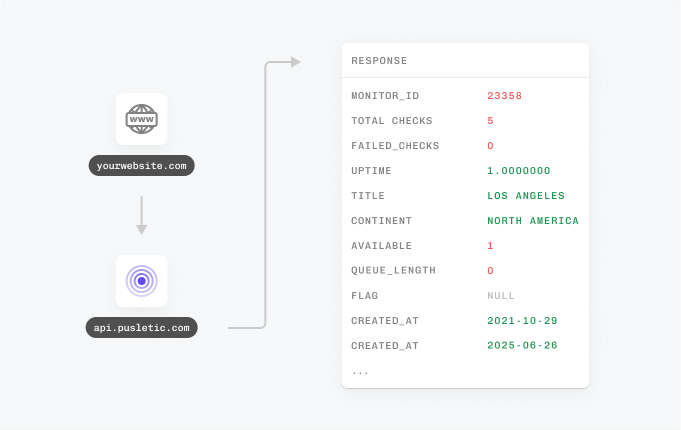
    With Pulsetic’s API, you’ve got complete control: you can add custom statistics, monitors & automations, create bespoke rules and maintain granular control over who can access or modify monitoring information. Best suited for developers in scale-up or large enterprises.

FAQ: Monitoring for Startups

  • Does a startup really need uptime monitoring before launch?

    Yes, and it is one of the cheapest pieces of credibility you can buy: it is free. Early users decide quickly whether your product feels solid, and the worst time to learn your website is down is from a prospect’s reply. Monitoring from day one means every outage is something you knew about first.

  • What does the free plan include?

    10 monitors, status pages and custom domains, free for commercial use with no credit card required. That covers a typical early-stage setup: the landing page, the app, the API and a few crons, plus a status page at status.yourstartup.com.

  • Can our status page run on our own domain on the free plan?

    Yes. Custom domains are included on the free plan, so your status page lives at status.yourstartup.com from day one. Branding, colors and subscriber notifications arrive with the paid plans from $9 per month when you want the fully polished version.

  • What should a startup monitor first?

    Start with the four things that lose you customers: the landing page with its signup flow, the product itself, the API behind it, and the scheduled jobs that handle billing or onboarding emails. Then add SSL certificate and domain expiry checks, the two renewals that startups forget most reliably.

  • An enterprise prospect is asking about our SLA. What do we do?

    Measure before you promise. Run monitoring for a couple of months, see what uptime you actually deliver, and set the SLA a safe margin below that. Pulsetic’s free uptime SLA calculator converts any target into allowed downtime, and your monitoring history becomes the evidence you attach to the deal.

  • What does it cost as we grow?

    Pricing is tiered, not metered per user: free to start, $9 per month on Solo, $19 on Team with two teammates and role-based access included, $49 on Organization with 300 monitors. Extra teammates are $8 each, a line item that stays small as you hire.

  • Can alerts reach the founder’s phone?

    Yes. Email alerts are free, Slack, Telegram and Discord arrive with the paid plans, and every paid tier includes SMS and phone call credits for the moments when nobody is looking at a screen. When you are a two-person team, the phone call tier is the on-call system.

  • Should we just self-host an open-source monitor instead?

    You can, and tools like Uptime Kuma are genuinely good. But self-hosting means another server to patch and back up, checks from a single location, and a monitor that goes down with your infrastructure, which is precisely when you need it. At a startup, every hour of ops time is product time; a hosted free plan keeps the focus where it belongs.