Ping Monitoring for any Network or Server

Developers, DevOps teams and business owners use Pulsetic to make sure all devices & servers are online, track network performance & latency and monitor internal systems.

* No credit card required

Made for You

  • Don't be the last to know when your server goes down

    With Pulsetic, you'll never be caught out by a server problem. Create as many monitors as you need to ensure your uptime 24/7/365.

  • Keep track of every essential device in your network

    Get instant alerts when any device goes offline. Supports both IPv4 and IPv6 addresses. Send an automatic ping test up to every 5 minutes, scalable for any kind of infrastructure.

  • See the trends in your server response time

    Understand how customers are experiencing your service and predict high levels of demand on your systems, with automating monitoring every 60 seconds.

"Pulsetic has transformed my website monitoring experience with its intuitive interface and real-time tracking capabilities. I love how effortlessly I can keep tabs on my site’s performance, ensuring everything runs smoothly!"

Koen Kanters
Koen Kanters

Senior Software Engineer at ASML

"Pulsetic is easy-to-use and simple to get started. As an agency, I like that it includes unlimited status pages, because I can create one for each of my clients. Pulsetic includes every alert channel that I want, and advanced settings that give me greater confidence in the uptime. I can require that a response include certain text and respond within a certain timeframe in order for a site to be considered online. This gives me assurance that we would be notified if there were major performance issues or a bad deployment that made the site unusable. These features come with every paid plan, so our monthly bill is predictable. The API is a huge bonus on the teams plan. We have used it to add maintenance windows for certain monitors automatically based on events that happen in other software we use."

Christopher Morbitzer

CEO at NorthBuilt

"Pulsetic’s monitoring is easy to set up via their super clean, user-friendly UI. I was up and running within only a few minutes. A helpful knowledge base is available for webmasters to refer to if needed. Pulsetic’s pricing is also some of the most competitive in the industry. I highly recommend them for emerging and established agencies alike."

Scott Werley
Scott Werley

Owner at Sporulate Design

"Pulsetic is easy to set up and integrate. You don’t need much time to get it running. The interface is clear and simple. It’s easy to see what’s going on at a glance. The design looks great, too. I had no trouble finding what I needed and monitoring my sites is straightforward. If you want a simple tool that works well, Pulsetic is a good choice."

Aryo Sayogha
Aryo Sayogha

CEO at MBDC Media

"The monitoring tool we’ve been waiting for. Super easy to set up monitoring, customizable status page design, and access to notifications across Slack, email and SMS. Pulsetic is awesome."

Andrei Negrau
Andrei Negrau

CEO at Siena AI

"Tens of thousands of business owners from around the world rely on our service, and Pulsetic is the best platform there is to ensure we communicate any downtimes clearly and swiftly to our customers to avoid panic and disappointment. Getting setup on Pulsetic not only been smooth and easy but super joyful too, the design is stunning and customisable unlike any other monitoring platform we’ve used."

Leo Bassam
Leo Bassam

Founder, CEO at Plutio

"Pulsetic has simplified our uptime monitoring significantly. We’ve fully automated uptime tracking and SLA reporting, which removed a lot of manual work from our monthly and annual reports. The automated downtime notifications (via Slack and email) help the team react quickly when something goes wrong. The API is especially valuable for us, as it allows us to use a dedicated health-check endpoint and integrate uptime data directly into our internal workflows."

Mariana Kodama
Mariana Kodama

Treasurer, Fundacion Jorge Luis Borges

"There’s an easy way for you to monitor your online project. After all the hard work you have put into going live, you want to make sure that things keep running smoothly while you focus on the next project."

Chris Kalmar
Chris Kalmar

Founder at nineLemon

"Pulsetic is super easy to use and fast. The UI is very simple and clean, and it offers all the right features. The status page design is also great, and we really liked the fact that we could set up alert notifications in multiple channels."

Akis Laopodis
Akis Laopodis

Founder at Qurioos

"Pulsetic helps us monitor all of our websites and webapps over at Pairing.dev. Before we used it, we had no idea how often services (e.g. heroku) were offline. Now we have complete control over it."

Till Carlos
Till Carlos

Founder at Pairing.dev

"Using Pulsetic is a big win for us! Our dev team can now deliver faster, with zero time spent monitoring our website uptime. Plus the interface is great and analytics proper."

Razvan Popescu
Razvan Popescu

Head of Marketing at AbstractAPI

Ping Monitoring is Easier with Pulsetic

  • Multi-location checks

    Multi-location Checks

    Pulsetic verifies ping incidents from at least three different locations before alerting you, so you don't receive stressful false positives.

  • Multi-channel alerts

    Multi-channel Alerts

    Get alerts however you want them: Pulsetic works with Slack, Microsoft Teams, Discord, Zapier, Webhooks and more. Or if you prefer, opt for a voice call or SMS.

  • Maintenance windows

    Maintenance Windows

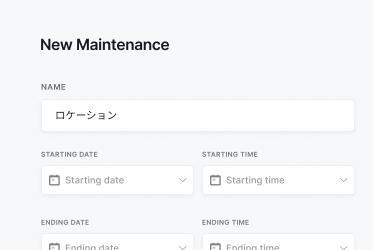
    Prepare for planned maintenance with monitoring you can pause in one click, so your team doesn't receive unnecessary downtime alerts.

  • Recurring notifications

    Recurring Notifications

    Be sure that issues are fixed effectively with recurrence and threshold parameters to monitor serious outages.

How Does the Ping Monitor Work?

You don't need to be technical to use Pulsetic; we've made it quick and simple for everyone.

  • Sign up for a free Pulsetic account and click «add monitor».

  • Add the IPv4 or IPv6 addresses and device names for your endpoints.

  • Get automated notifications for downtime, wherever you want them.

  • For DevOps Teams

    Identify and resolve network connectivity issues before they impact user experiences.

  • For IT Managers

    Monitor essential network hardware and servers to ensure reliable operations.

  • For Business Owners

    Maintain consistent access to key systems and prevent high-cost downtime.

  • For IoT Developers

    Monitor the health of internet-connected devices for optimal performance.

  • Bring in your whole team.

    Need access for more than one person? Pulsetic is for you. Easily manage access controls with specific rights and permissions for individual users, so you can collaborate without compromising on security.

  • Team access
  • API
  • Connect your API for even more flexibility.

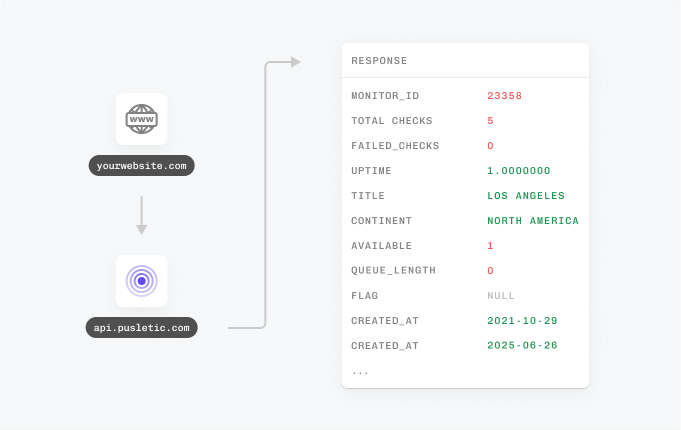
    With Pulsetic’s API, you’ve got complete control: you can add custom statistics, monitors & automations, create bespoke rules and maintain granular control over who can access or modify monitoring information. Best suited for developers in scale-up or large enterprises.

FAQ: Ping Monitoring

  • What is ping monitoring, and how does it work?

    Ping monitoring checks the availability and responsiveness of a server, device, or website by sending a "ping" signal and measuring the response time. It helps ensure your systems are online and performing efficiently.

  • How can ping monitoring help prevent website downtime?

    Ping monitoring continuously checks your website's uptime and immediately alerts you if the ping fails, allowing you to respond quickly to outages.

  • What's the best way to monitor a website's responsiveness using ping?

    The best way is to use an automated ping monitoring tool that performs regular checks and provides instant alerts if response times are slow or pings fail.

  • What issues can slow ping responses indicate?

    Slow ping responses may indicate network congestion, server overload, or connectivity issues, all of which can affect user experience and system reliability.

  • How frequently does ping monitoring check a website or server?

    Most ping monitoring tools allow customizable check intervals, ranging from seconds to minutes, depending on your monitoring needs.

  • Can ping monitoring detect intermittent connectivity problems?

    Yes, by running frequent checks, ping monitoring tools can identify patterns of intermittent connectivity issues that might otherwise go unnoticed.

  • What are the main benefits of using ping monitoring tools?

    Ping monitoring ensures uptime, detects performance bottlenecks, and provides actionable alerts to maintain system reliability.

  • How does ping monitoring integrate with alert systems?

    Ping monitoring tools send notifications via email, SMS, or integrations like Slack or webhooks, ensuring you're promptly informed about any issues.

  • Does Pulsetic ping monitoring support IPv6?

    Yes. Pulsetic supports both IPv4 and IPv6 addresses for ping monitoring. Enter any IPv4 or IPv6 address and Pulsetic will send pings on the same schedule as any other monitor.