• Need an incident.io underline
    alternative?

    Try Pulsetic. Know you’re down before anyone opens an incident, for a fraction of the price.

    Learn why...

    No credit
    card required.

  • Looking for an incident.io alternative?

Pulsetic vs incident.io: the breakdown

incident.io is built for coordinating response teams in Slack once an incident is underway. It doesn’t detect outages itself; it relies on monitoring tools like Datadog or Grafana to raise the alarm.

Pulsetic starts one step earlier. It monitors your websites from up to 15 locations around the world, alerts you once a second location confirms something is down, and keeps your customers informed with beautiful status pages in their own language.

And there’s another reason people searching for an incident.io alternative land on Pulsetic: a flat plan price, with 2 teammates included on Team and extra seats at $8 each.

Let's compare the two.

  • Uptime monitoring built in

    Uptime monitoring built in

    incident.io doesn’t check whether your website is up; it ingests alerts from monitoring tools you buy separately. Pulsetic does the detection itself, with checks down to every 30 seconds from up to 15 locations worldwide. One tool, not two.

  • Beautiful status badges

    Beautiful status badges

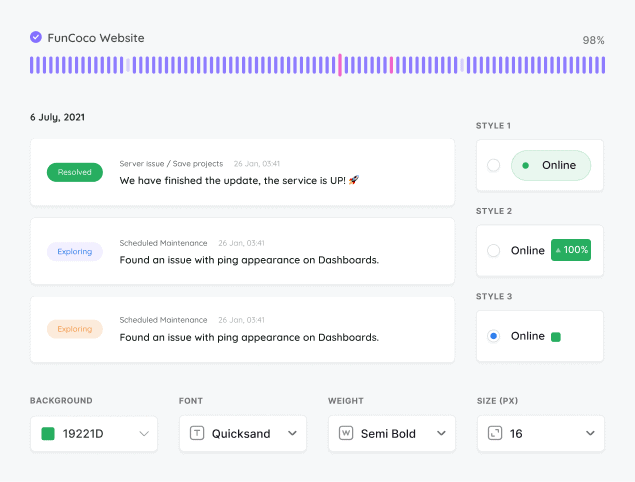
    incident.io offers no embeddable status badge, only a JSON widget API so you can build your own. From the $9 Solo plan, Pulsetic gives you a status badge showing your live status on any page you like, customizable to your brand in minutes: colors, fonts, text and backgrounds, or full Custom CSS.

  • Your colors on your status page

    Your colors on your status page

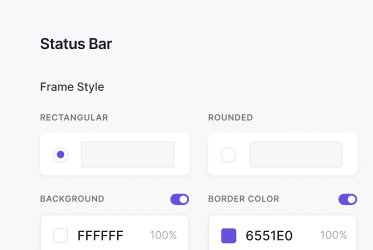
    incident.io status pages take a logo, favicon and light or dark mode, but custom colors, layout changes and CSS are unavailable, and its footer branding stays. On Pulsetic, colors, logos, layouts and CSS start on the $9 Solo plan, and the Team plan removes Pulsetic branding entirely.

  • “The monitoring tool we’ve been waiting for. Super easy to set up monitoring, customizable status page design, and access to notifications across Slack, email and SMS. Pulsetic is awesome.”

  • Andrei Negrau

    Andrei Negrau

    CEO at Siena AI

Pricing: Pulsetic vs incident.io

  • Free plans

    incident.io’s free Basic plan gives you Slack or Teams incident response, one on-call schedule, one public status page and one workflow. What it lacks is monitoring, so you still don’t know when you’re down. Pulsetic’s free plan covers the whole job: 10 uptime monitors plus three status pages on custom domains.

  • Per seat vs flat price

    incident.io starts at $15 per user per month billed annually ($19 monthly), and on-call paging is a separate add-on at about $10 more per user. Pulsetic’s alternative to incident.io is $9/month flat for monitoring, status pages, badges and alerts, and the $19 Team plan includes 2 teammates.

  • Team plans

    Five responders on incident.io’s cheapest paid tier with on-call run about $125/month, before you’ve paid for any monitoring underneath. Pulsetic’s Team plan starts at $19/month with 100 SMS and voice-call alert credits, 2 teammates and the monitoring included.

Feature comparison

PulseticPulsetic

incident.io

Free plan / trial

Free Plan

Free Plan

Price (USD/mo)

$9

$19/user ($15 billed annually)

Monitoring

Check time

30 sec (Team plan)

n/a

Real User Monitoring (RUM)

✕

Choice of regional data centers

✕

SSL monitoring

✕

Keyword monitoring

✕

Ping / ICMP monitoring

✕

Port monitoring

✕

TCP monitoring

✕

Domain monitoring

✕

Cron / heartbeat monitoring

Custom HTTP requests

✕

Customized responses

✕

Downtime screenshots

Team plan and up

✕

Chart annotations

✕

API

Solo plan and up

Built-in AI assistant (chat)

Solo plan and up

MCP server

Solo plan and up

n8n integration

Solo plan and up

✕

Cloudflare IP allowlisting

✕

Monitoring data retention

3 mo to 5 yr by plan

n/a

Status Pages

Incident updates

Solo plan and up

Status updates for subscribers via email

Solo plan and up

Maintenance windows

Solo plan and up

Status badges

Solo plan and up

✕

Customized domain

Customized colors

Solo plan and up

✕

Customized logo

Solo plan and up

Remove branding

Team plan and up

✕

Customized status page layout

Solo plan and up

✕

CSS customization

Solo plan and up

✕

Custom email sender & templates

Solo plan and up

✕

AI writing assistant

Solo plan and up

Page translations

Password-protected status page

Solo plan and up

✕

SSO-protected status page

Organization plan

✕

Notifications

Email alerts

SMS alerts

Solo plan and up

Phone call alerts

Solo plan and up

WhatsApp alerts

Solo plan and up

Team plan and up

Slack alerts

Solo plan and up

MS teams alerts

Solo plan and up

Discord alerts

Solo plan and up

✕

Telegram alerts

Solo plan and up

✕

Mattermost alerts

Solo plan and up

✕

Webhooks alerts

Zapier alerts

Solo plan and up

Twilio alerts

Solo plan and up

✕

Datadog integration

Solo plan and up

Integration with SIGNL4

Solo plan and up

✕

Analytics

See response times

✕

Response time by location

✕

Custom date range reports

Scheduled email reports

Web Analytics & RUM

Cookieless tracking

n/a

Core Web Vitals (field data)

n/a

Load time percentiles (p50/p75/p95)

n/a

JS error tracking

n/a

Realtime visitors

n/a

Traffic breakdowns (pages, geo, devices)

n/a

Goals / custom events

✕

n/a

Analytics data retention

3 mo to 5 yr by plan

n/a

Self-hostable

✕

✕

Security

Two-factor authentication

✕

Single Sign-On (SAML)

Organization plan

Pro plan and up

Role-based access

Team plan and up

Support

Chat

Human Support

AI Support

✕

Helpdesk Articles

Email Support

Comparison based on publicly available information as of September 2026. Features and pricing change frequently, so please verify current details on each provider’s website.

Trusted by teams at companies around the world

  • image/svg+xml
  • image/svg+xml Mercedes-Benz logo
  • image/svg+xml
  • image/svg+xml

And there’s more in Pulsetic’s free plan…

  • Find why your website is slow

    See where your website is loading slowly

    We’ll check your website’s response times from different locations around the world, so you know if there’s an issue in a particular region.

  • Alerts wherever you want them

    Alerts wherever you want them

    When your website fails a check and a second location confirms it, Pulsetic alerts you by email or webhook. Slack, Telegram, SMS, WhatsApp and voice-call alerts start on the $9 Solo plan.

  • Never let your SSL expire again

    Never let your SSL expire again

    We’ll let you know when it’s time to update your SSL certificate, so you can renew it before customers see error messages.

  • You wanted to know when you’re down, not a whole incident platform.

    2-minute setup · Cancel any time

  • No credit card needed

Frequently asked questions

  • Does incident.io monitor uptime?

    No. incident.io runs no uptime checks of its own: no HTTP, SSL, ping, port, TCP or domain monitoring from any location. It is an on-call and incident response layer that ingests alerts from external monitoring tools like Datadog, Prometheus or Grafana. The one exception is passive heartbeat monitoring for cron jobs on paid On-call plans. To actually detect an outage you still need a separate monitoring tool. Pulsetic is that tool, and it includes status pages too: it checks your websites as often as every 30 seconds from up to 15 locations worldwide.

  • How much does incident.io actually cost?

    The advertised price is $15 per user per month billed annually ($19 monthly), but on-call paging is a separate add-on at roughly $10 per user per month, and viewer seats convert to paid responder seats the moment someone acts on an incident. Five responders with on-call come to about $125 per month, and you still have not paid for the monitoring tool that detects outages. Pulsetic starts at $9 per month flat, monitoring included.

  • Does incident.io have a free plan?

    Yes. The free Basic plan includes Slack or Microsoft Teams incident response, one on-call schedule, one public status page and one workflow. What it does not include is any uptime monitoring, so on the free plan you still need another product to know when you are down. Pulsetic's free plan covers both jobs: 10 uptime monitors and three status pages on your own domain, in one tool.

  • Can I customize an incident.io status page?

    Only lightly. You can set a logo, favicon and custom domain, pick light or dark mode and, since August 2026, choose the page's language from English and eight others. Custom colors, layout changes, CSS and removing the incident.io footer branding are explicitly unavailable. On every Pulsetic plan, status pages run on your own domain and you can translate them, typing each label's wording yourself. Custom colors, logos, layouts and CSS start on the $9 Solo plan, and full white labeling comes with Team.

  • What is the best cheaper alternative to incident.io?

    It depends on the job. incident.io is excellent at coordinating large incident response teams in Slack. But if what you need is to know when your website goes down and to tell your customers about it, Pulsetic covers exactly that from $9 per month flat: uptime monitoring from 5 locations on Solo and 15 on Team, alerts by phone call, SMS, WhatsApp, email, Slack and more, plus customizable status pages and badges. Team includes 2 teammates, and each extra seat is $8.

  • Is incident.io overkill for a small team?

    Reviewers rate incident.io highly, around 4.8 out of 5 on G2, but the recurring complaints are cost and fit: the real price climbs well past the sticker price once on-call is added, and the product is built for orchestrating many responders across big organizations. Small teams usually need detection first, coordination later. Pulsetic gives you the detection and customer communication for a flat price, and you can add an incident response platform when you genuinely outgrow it.

  • Can Pulsetic and incident.io work together?

    Yes. incident.io is designed to receive alerts from monitoring tools through its alert sources, and Pulsetic can send webhook alerts when a monitor goes down. So Pulsetic can be the detection layer that triggers incident.io's response workflows. Many teams find that Pulsetic's own alerting and status pages cover them well before they need a dedicated incident coordination product on top.

  • Can I migrate my status page from incident.io to Pulsetic?

    Yes. Recreate your components as Pulsetic monitors, point your custom domain at the new page and invite your subscribers. You also gain things incident.io's pages cannot do. From the $9 Solo plan you add custom colors and layouts, CSS control and embeddable status badges, and Team adds full white labeling. The page also updates itself, because Pulsetic does the monitoring. If you need help with the move, the support team will walk you through it.