• Need an Opsgenie underline
    alternative?

    You will soon. Opsgenie shuts down in April 2027. Pulsetic bundles the monitoring, alerts and status page in one.

    Learn why...

    No credit
    card required.

  • Looking for an Opsgenie alternative?

Pulsetic vs Opsgenie: the breakdown

Opsgenie was a fine alerting tool, which is exactly why its retirement stings. Atlassian stopped selling it in June 2025, and on April 5, 2027 the app and APIs switch off for good, deleting whatever data wasn’t migrated.

Here’s the part worth rethinking before you follow the default migration: Opsgenie never monitored anything. It waited for other tools to raise alerts, and a public status page meant buying Statuspage separately.

That’s why teams searching for an Opsgenie alternative land on Pulsetic: the detection, the status page and, from $9, the phone and SMS alerts, in one flat-price tool.

Let’s compare the two.

  • Monitoring built in, not bolted on

    Monitoring built in, not bolted on

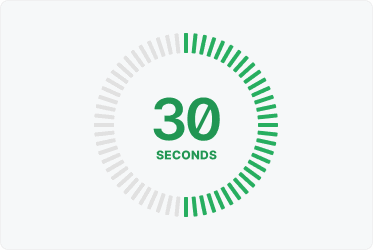
    Opsgenie needed Datadog, Nagios or another monitor to tell it something broke. Pulsetic does its own checking, from up to 15 locations as often as every 30 seconds, and pages you when a check fails and a second location confirms it.

  • A real public status page

    A real public status page

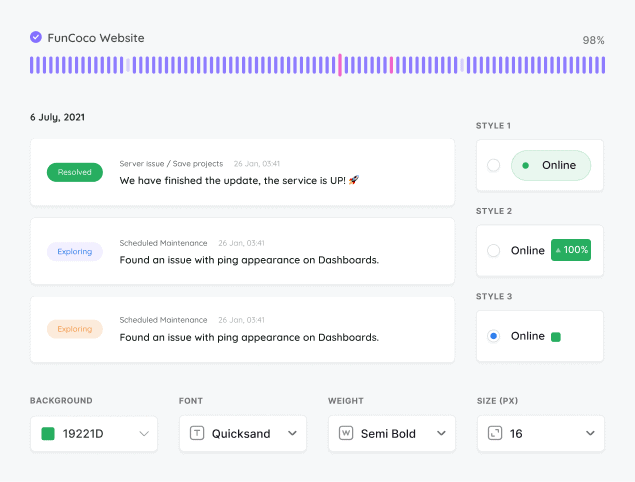
    Opsgenie’s status view was internal only; Atlassian’s answer for a public one was a do-it-yourself AWS recipe or a separate Statuspage bill. Pulsetic includes customizable public status pages with subscriber emails and badges from $9.

  • A home, not a deadline

    A home, not a deadline

    Every Opsgenie renewal now ends before April 2027, and the official destinations are a ticketing suite or a developer portal. Pulsetic is an actively developed monitoring product, so the next move can be the last one for a while.

  • “Pulsetic has simplified our uptime monitoring significantly. The automated downtime notifications (via Slack and email) help the team react quickly when something goes wrong. The API is especially valuable for us, as it allows us to use a dedicated health-check endpoint and integrate uptime data directly into our internal workflows.”

  • Mariana Kodama

    Mariana Kodama

    Treasurer, Fundacion Jorge Luis Borges

Pricing: Pulsetic vs Opsgenie

  • Free plans

    Opsgenie’s free tier covered 5 users but has been closed to new signups since June 2025, and it never included incident management, voice calls or a status page. Pulsetic’s free plan is open to everyone: 10 monitors, status pages and custom domains included.

  • Per user, plus the rest

    Five people on Opsgenie Standard came to about $100/month, and still needed a separate monitoring tool to feed it alerts, with Statuspage sold on top. Pulsetic’s alternative to Opsgenie is $9/month flat, detection and status page included.

  • Team plans

    Pulsetic’s Team plan starts at $19/month with 2 teammates, role-based access and 100 SMS and voice-call credits included. Extra seats are $8 each, there are no metered SMS surprises, and nothing in the stack expires in 2027.

Feature comparison

PulseticPulsetic

Opsgenie (end of life)

Free plan / trial

Free Plan

Closed to new signups

Price (USD/mo)

$9

$9.45/user (renewals only)

Monitoring

Check time

30 sec (Team plan)

n/a

Real User Monitoring (RUM)

✕

Choice of regional data centers

✕

SSL monitoring

✕

Keyword monitoring

✕

Ping / ICMP monitoring

✕

Port monitoring

✕

TCP monitoring

✕

Domain monitoring

✕

Cron / heartbeat monitoring

Standard plan and up

Custom HTTP requests

✕

Customized responses

✕

Downtime screenshots

Team plan and up

✕

Chart annotations

✕

API

Solo plan and up

Until Apr 2027

Built-in AI assistant (chat)

Solo plan and up

n/a

MCP server

Solo plan and up

✕

n8n integration

Solo plan and up

✕

Cloudflare IP allowlisting

✕

Monitoring data retention

3 mo to 5 yr by plan

n/a

Status Pages

Incident updates

Solo plan and up

Internal only

Status updates for subscribers via email

Solo plan and up

Internal only

Maintenance windows

Solo plan and up

Alert muting only

Status badges

Solo plan and up

✕

Customized domain

✕

Customized colors

Solo plan and up

✕

Customized logo

Solo plan and up

✕

Remove branding

Team plan and up

✕

Customized status page layout

Solo plan and up

✕

CSS customization

Solo plan and up

✕

Custom email sender & templates

Solo plan and up

✕

AI writing assistant

Solo plan and up

✕

Page translations

✕

Password-protected status page

Solo plan and up

✕

SSO-protected status page

Organization plan

✕

Notifications

Email alerts

SMS alerts

Solo plan and up

Metered

Phone call alerts

Solo plan and up

Paid plans

WhatsApp alerts

Solo plan and up

✕

Slack alerts

Solo plan and up

MS teams alerts

Solo plan and up

Discord alerts

Solo plan and up

✕

Telegram alerts

Solo plan and up

✕

Mattermost alerts

Solo plan and up

Webhooks alerts

Standard plan and up

Zapier alerts

Solo plan and up

Twilio alerts

Solo plan and up

Native SMS/voice

Datadog integration

Solo plan and up

Integration with SIGNL4

Solo plan and up

✕

Analytics

See response times

✕

Response time by location

✕

Custom date range reports

Alert analytics only

Scheduled email reports

✕

Web Analytics & RUM

Cookieless tracking

n/a

Core Web Vitals (field data)

n/a

Load time percentiles (p50/p75/p95)

n/a

JS error tracking

n/a

Realtime visitors

n/a

Traffic breakdowns (pages, geo, devices)

n/a

Goals / custom events

✕

n/a

Analytics data retention

3 mo to 5 yr by plan

n/a

Self-hostable

✕

✕

Security

Two-factor authentication

Via Atlassian account

Single Sign-On (SAML)

Organization plan

Standard plan and up

Role-based access

Team plan and up

Support

Chat

✕

Human Support

Until Apr 2027

AI Support

✕

Helpdesk Articles

Email Support

Comparison based on publicly available information as of September 2026. Features and pricing change frequently, so please verify current details on each provider’s website.

Trusted by teams at companies around the world

  • image/svg+xml
  • image/svg+xml Mercedes-Benz logo
  • image/svg+xml
  • image/svg+xml

And there’s more in Pulsetic’s free plan…

  • See where your website is loading slowly

    See where your website is loading slowly

    We’ll check your website’s response times from different locations around the world, so you know if there’s an issue in a particular region.

  • Alerts wherever you want them

    Alerts wherever you want them

    When your website fails a check and a second location confirms it, Pulsetic alerts you by email or webhook. Slack, Telegram, SMS, WhatsApp and voice-call alerts start on the $9 Solo plan.

  • Never let your SSL expire again

    Never let your SSL expire again

    We’ll let you know when it’s time to update your SSL certificate, so you can renew it before customers see error messages.

Frequently asked questions

  • When does Opsgenie shut down?

    Atlassian closed Opsgenie to new purchases, trials and plan changes on June 4, 2025, and the product shuts down entirely on April 5, 2027: the app stops working, the REST APIs go dark, and any data that has not been migrated is permanently deleted. Existing customers can only renew for terms that end before that date. Whatever you choose next, the move is not optional.

  • What does Atlassian want Opsgenie customers to migrate to?

    Atlassian offers an automated migration to Jira Service Management for IT and ops teams or Compass for engineering teams, with a period of parallel running. Community sentiment is mixed: JSM is a ticketing-first ITSM suite that many alerting-focused teams find heavier than what they had, and neither destination has full feature parity with Opsgenie. That is why many teams treat the shutdown as a chance to rethink the stack rather than follow the default path.

  • Did Opsgenie monitor uptime?

    No. Opsgenie never ran uptime checks: no HTTP, SSL, keyword, ping, port or domain monitoring from any location. It sat downstream of monitoring tools and routed the alerts they raised, with heartbeat monitoring for cron jobs as its only native check, gated to Standard plans and up. Teams always needed a separate monitoring tool underneath it. Pulsetic is that detection layer with the alerting built in: checks from as many as 15 locations on Team and Organization, status pages, email alerts on every plan, and phone, SMS, WhatsApp and Slack alerts from the $9 Solo plan.

  • Does Opsgenie have a public status page?

    No. Opsgenie's service status feature is internal, visible only to logged-in account users, and Atlassian's documentation for a public page from Opsgenie alerts is a build-it-yourself recipe on AWS. A real customer-facing page meant buying Statuspage as a separate product. Pulsetic includes customizable public status pages with subscriber notifications in every paid plan.

  • Can Pulsetic replace Opsgenie's alerting?

    For monitoring-driven alerting, yes: Pulsetic detects the problem itself and alerts you, so the detect-then-page loop lives in one tool. Email and webhooks work on every plan, and phone calls, SMS, WhatsApp, Slack, Telegram and Microsoft Teams start on the $9 Solo plan. If your team relies on Opsgenie's deeper on-call machinery, complex escalation chains, rotations and incident command, pair Pulsetic with a dedicated on-call platform: Pulsetic webhooks can feed whichever one you choose. Many smaller teams discover the simpler loop is all they actually used.

  • How does Pulsetic pricing compare to what Opsgenie cost?

    Opsgenie charged per user: a 5-person team on Standard, the realistic tier once you needed outgoing integrations, incident management or heartbeats, paid about $100 per month, and SMS was metered on the lower tiers. And because Opsgenie did no monitoring, the real stack cost included a separate uptime tool, and often Statuspage too. Pulsetic is flat: $9 per month on Solo or $19 on Team, with phone and SMS credits, monitoring and status pages included. Team comes with 2 teammates, and each extra seat is $8.

  • What should I check before leaving Opsgenie?

    Export what you want to keep well before April 2027: alert history, heartbeat configurations, schedules and integration lists, since unmigrated data is deleted at shutdown. Then map what you actually used. Heartbeat monitors translate directly to Pulsetic's cron monitoring. Alert channels map to Pulsetic's email and webhook alerts, plus phone, SMS, WhatsApp and chat on the Solo plan and up. The monitoring tools that fed Opsgenie may become unnecessary once Pulsetic does the checking itself.

  • Why pick Pulsetic over another on-call tool?

    It depends what Opsgenie was doing for you. If it was paging you when monitoring tools noticed a problem, Pulsetic collapses that into one subscription from $9 a month: the monitoring, the paging and the public status page. If you are a large organization with heavy incident command needs, an on-call platform still has its place, and Pulsetic plays nicely as the detection layer. Either way you end up with fewer tools than the Opsgenie-plus-monitor-plus-Statuspage stack you are leaving.