Uptime Monitoring for DevOps Teams

Your dashboards say healthy; a user says down. Pulsetic is the black-box check from outside: probes from 15 locations worldwide, alerts routed into your on-call stack, and an API to manage all of it as code.

* No credit card required

Made for You

  • The outside view your metrics miss

    Internal monitoring sees pods and processes; your users see DNS, certificates, CDNs and routing. Pulsetic checks the path they actually take, from 15 locations worldwide, and catches the failures that keep internal dashboards green.

  • Alerts that join your workflow

    Failed checks land in Slack, Microsoft Teams, Telegram or Discord, escalate by SMS and phone call when it matters, and flow through webhooks into your incident tooling. No new inbox to watch.

  • Monitors as code

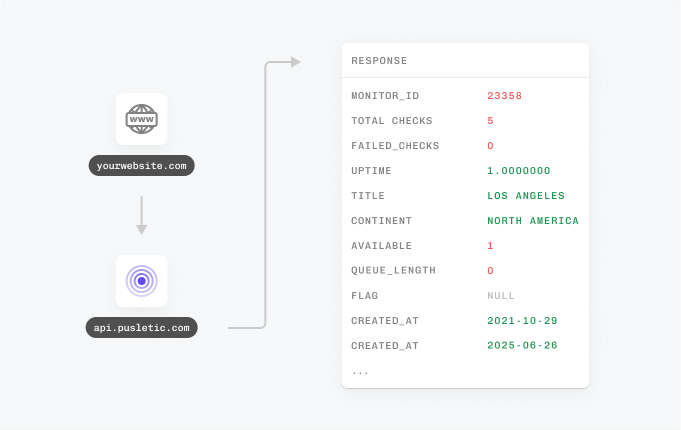
    Provision monitors at deploy time with the REST API and its OpenAPI spec, let your AI assistant manage them through the MCP server, or automate without code in n8n. The dashboard is optional.

"Tens of thousands of business owners from around the world rely on our service, and Pulsetic is the best platform there is to ensure we communicate any downtimes clearly and swiftly to our customers to avoid panic and disappointment. Getting setup on Pulsetic not only been smooth and easy but super joyful too, the design is stunning and customisable unlike any other monitoring platform we’ve used."

Leo Bassam
Leo Bassam

Founder, CEO at Plutio

"There's an easy way for you to monitor your online project. After all the hard work you have put into going live, you want to make sure that things keep running smoothly while you focus on the next project."

Chris Kalmar
Chris Kalmar

Founder at nineLemon

"Pulsetic is super easy to use and fast. The UI is very simple and clean, and it offers all the right features. The status page design is also great, and we really liked the fact that we could set up alert notifications in multiple channels."

Akis Laopodis
Akis Laopodis

Founder of HelpfulDocs

"The monitoring tool we've been waiting for. Super easy to set up monitoring, customizable status page design, and access to notifications across Slack, email and SMS. Pulsetic is awesome."

Andrei Negrau
Andrei Negrau

CEO at Cartloop.io

"Pulsetic helps us monitor all of our websites and webapps over at Pairing.dev. Before we used it, we had no idea how often services (e.g. heroku) were offline. Now we have complete control over it."

Till Carlos
Till Carlos

Founder at Pairing.dev

"Using Pulsetic is a big win for us! Our dev team can now deliver faster, with zero time spent monitoring our website uptime. Plus the interface is great and analytics proper."

Razvan Popescu
Razvan Popescu

Head of Marketing at AbstractAPI

Cover the Whole Surface

  • Production endpoints

    HTTP and HTTPS checks with custom headers and methods confirm your services answer correctly for real clients, not just for localhost.

  • APIs and payloads

    API monitoring watches status codes and response times, and keyword checks verify the payload says what it should, even behind a 200 code.

  • Infrastructure services

    TCP and port monitoring confirm databases, brokers and custom services are accepting connections wherever they are exposed.

  • Cron jobs and queues

    Heartbeat monitoring expects pings from your scheduled jobs and workers, so a silently dead crontab finally makes some noise.

  • SSL certificates

    SSL monitoring reminds you 14, 7 and 1 days before expiry, so certificate renewals stop depending on someone’s calendar memory.

  • Domains and DNS

    Domain monitoring tracks expirations and nameserver problems, the failure mode everyone forgets until the whole stack goes dark.

And a status page on both sides of the firewall

Run a public status page for customers and a password-protected one for engineering, both fed by the same monitors, with status badges for your docs site and internal dashboards.

How Does It Work for a DevOps Team?

Click through the dashboard or script the whole setup; both take minutes.

  • Sign up free and add monitors in the dashboard, or provision them through the API on Team plans.

  • Point alerts at Slack, Teams, SMS, phone or webhooks into your incident tooling.

  • Sleep. Multi-location checks confirm an incident is real before anyone gets paged.

  • For DevOps Teams

    Get the external black-box view of production and route alerts into the on-call workflow you already run.

  • For System Administrators

    Watch servers, open ports and scheduled jobs from outside your network, with SSL and domain expiry covered too.

  • For Developers

    Provision and manage monitors from code with the REST API, the MCP server or the n8n integration.

  • For IT Managers

    Prove delivered uptime with reports and history, independent of the team that runs the infrastructure.

  • Bring in your whole team.

    Need access for more than one person? Pulsetic is for you. Easily manage access controls with specific rights and permissions for individual users, so you can collaborate without compromising on security.

  • Team access
  • API
  • Connect your API for even more flexibility.

    With Pulsetic’s API, you’ve got complete control: you can add custom statistics, monitors & automations, create bespoke rules and maintain granular control over who can access or modify monitoring information. Best suited for developers in scale-up or large enterprises.

FAQ: Monitoring for DevOps

  • Does Pulsetic replace Prometheus or Grafana?

    No, it complements them. Internal metrics tell you how your systems feel from the inside; Pulsetic is the black-box view from outside, checking what your users actually reach. DNS mistakes, expired certificates, broken CDN routes and dead load balancers all happen while internal dashboards stay green, and an external check is how you catch them.

  • How do alerts fit into our existing on-call workflow?

    Pulsetic notifies the channels your team already watches: Slack, Microsoft Teams, Telegram, Discord and email, with SMS and phone calls for the wake-someone-up tier. Webhooks carry alerts into anything else, including incident management and on-call platforms, so a failed check can open an incident in the tool you already use.

  • Can we manage monitors as code?

    Yes. Pulsetic’s REST API covers monitors, heartbeats, domains, status pages and notification channels, ships an OpenAPI spec, and authenticates with a simple token, so provisioning a monitor at deploy time is one HTTP call. There is also an official MCP server, so AI assistants like Claude can create and manage monitors, and an n8n integration for no-code automations.

  • How does Pulsetic avoid false alerts?

    Checks run from up to 15 locations worldwide, so a routing blip near one probe does not page your on-call engineer. An incident is confirmed from multiple regions before the alert fires, which keeps 3am pages rare and real.

  • Can we monitor internal infrastructure services?

    Pulsetic checks anything reachable from the internet: HTTP endpoints, TCP services and open ports, including databases and brokers exposed on public interfaces. For services on private networks, flip the pattern: heartbeat monitors expect a periodic ping from inside your network, so a silent job or unreachable service raises an alert without Pulsetic needing a way in.

  • What about cron jobs, queues and CI tasks?

    Heartbeat monitoring covers everything scheduled: cron jobs, queue workers, backups and recurring CI tasks ping a unique URL when they complete, and you are alerted when the ping does not arrive on time. A silent crash stops being silent.

  • Can we run a status page for the team only?

    Yes. Status pages can be password-protected, so you can keep an internal page for engineering while running a public one for customers, both fed by the same monitors and hosted on your own domains.

  • What does Pulsetic cost for a team?

    Pricing is tiered rather than metered per user: the free plan covers 10 monitors with status pages, and the Team plan starts at $19 per month with role-based access, 100 SMS and voice-call credits, plus API, MCP and n8n access. Two teammates are included, and extra seats are a flat $8 instead of a full per-user license.

Hey there 👋  Friends from designmodo are here to help!