Automate your Keyword Monitoring

Pulsetic is how developers, IT teams and business owners detect issues like blank pages, malfunctioning third-party tools, or changes in product availability - without relying on traditional downtime monitoring.

* No credit card required

Catch hard-to-find issues before they impact users

  • Track the health of your third-party embeds & tools

    Pulsetic monitors embedded widgets and tools like contact forms - so you'll immediately know they've failed even when the rest of your website is operational. Fix issues quicker and be confident all features are functioning normally, without the hassle of regular manual tests.

  • Detect hard-to-find issues

    Traditional uptime monitoring can't always detect issues like blank pages - because technically, the website itself is still live. Pulsetic monitors individual keywords appearing or disappearing from a page, so you can be sure that if there's an unseen problem, you'll know about it.

  • Manage ecommerce inventory more accurately

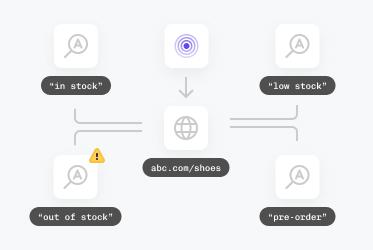
    Track your website - or a competitor's - for keywords like 'sold out' or 'back in stock' to stay ahead of purchase trends and avoid stock-outs - quicker and much cheaper than typical ecommerce inventory management tools.

Trusted by teams at companies around the world

"Pulsetic made monitoring something I barely think about anymore. The interface is clean and the tracking is real-time, so I can glance at my site’s performance and get back to work."

Koen Kanters
Koen Kanters

Senior Software Engineer at ASML

"Pulsetic is easy-to-use and simple to get started. As an agency, I like that it includes unlimited status pages, because I can create one for each of my clients. Pulsetic includes every alert channel that I want, and advanced settings that give me greater confidence in the uptime. I can require that a response include certain text and respond within a certain timeframe in order for a site to be considered online. This gives me assurance that we would be notified if there were major performance issues or a bad deployment that made the site unusable. These features come with every paid plan, so our monthly bill is predictable. The API is a huge bonus on the teams plan. We have used it to add maintenance windows for certain monitors automatically based on events that happen in other software we use."

Christopher Morbitzer

CEO at NorthBuilt

"Pulsetic’s monitoring is easy to set up via their super clean, user-friendly UI. I was up and running within only a few minutes. A helpful knowledge base is available for webmasters to refer to if needed. Pulsetic’s pricing is also some of the most competitive in the industry. I highly recommend them for emerging and established agencies alike."

Scott Werley
Scott Werley

Owner at Sporulate Design

"Pulsetic is easy to set up and integrate. You don’t need much time to get it running. The interface is clear and simple. It’s easy to see what’s going on at a glance. The design looks great, too. I had no trouble finding what I needed and monitoring my sites is straightforward. If you want a simple tool that works well, Pulsetic is a good choice."

Aryo Sayogha
Aryo Sayogha

CEO at MBDC Media

"The monitoring tool we’ve been waiting for. Super easy to set up monitoring, customizable status page design, and access to notifications across Slack, email and SMS. Pulsetic is awesome."

Andrei Negrau
Andrei Negrau

CEO at Siena AI

"Tens of thousands of business owners from around the world rely on our service, and Pulsetic is the best platform there is to ensure we communicate any downtimes clearly and swiftly to our customers to avoid panic and disappointment. Getting setup on Pulsetic not only been smooth and easy but super joyful too, the design is stunning and customisable unlike any other monitoring platform we’ve used."

Leo Bassam
Leo Bassam

Founder, CEO at Plutio

"Pulsetic cut down our uptime monitoring work a lot. We automated uptime tracking and SLA reporting, which took a chunk of manual effort out of our monthly and annual reports. The Slack and email alerts let the team jump on problems quickly, and the API is what really sold us, since we point a dedicated health-check endpoint at it and pull uptime data straight into our internal workflows."

Mariana Kodama
Mariana Kodama

Treasurer, Fundacion Jorge Luis Borges

"There’s an easy way for you to monitor your online project. After all the hard work you have put into going live, you want to make sure that things keep running smoothly while you focus on the next project."

Chris Kalmar
Chris Kalmar

Founder at nineLemon

"Pulsetic is fast and genuinely easy to use. The UI is clean and has the features we actually needed, the status pages look good, and being able to route alerts to several channels was a real plus for us."

Akis Laopodis
Akis Laopodis

Founder at Qurioos

"Pulsetic helps us monitor all of our websites and webapps over at Pairing.dev. Before we used it, we had no idea how often services (e.g. heroku) were offline. Now we have complete control over it."

Till Carlos
Till Carlos

Founder at Pairing.dev

"Using Pulsetic is a big win for us! Our dev team can now deliver faster, with zero time spent monitoring our website uptime. Plus the interface is great and analytics proper."

Razvan Popescu
Razvan Popescu

Head of Marketing at AbstractAPI

Keyword monitoring is simpler with Pulsetic

  • Alerts in Slack, Microsoft Teams, Discord, SMS - and everywhere else

    Alerts in Slack, Microsoft Teams, Discord, SMS - and everywhere else

    Wherever you're working, Pulsetic's there. Integrate with whatever work platform you use, create Zaps or Webhooks, or opt for voice call, SMS and email notifications. So you always get keyword alerts fast enough to act on them.

  • Bring in your whole team

    Bring In Your Whole Team

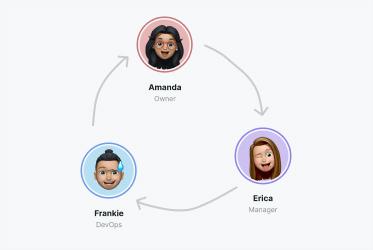
    Need access for more than one person? Pulsetic is for you. Easily manage access controls with specific rights and permissions for individual users, so you can collaborate without compromising on security.

  • Connect your API for even more flexibility

    Connect your API for even more flexibility

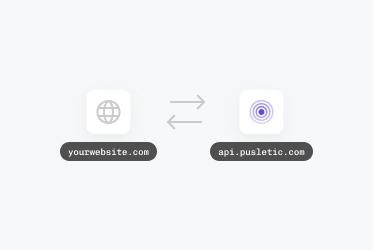
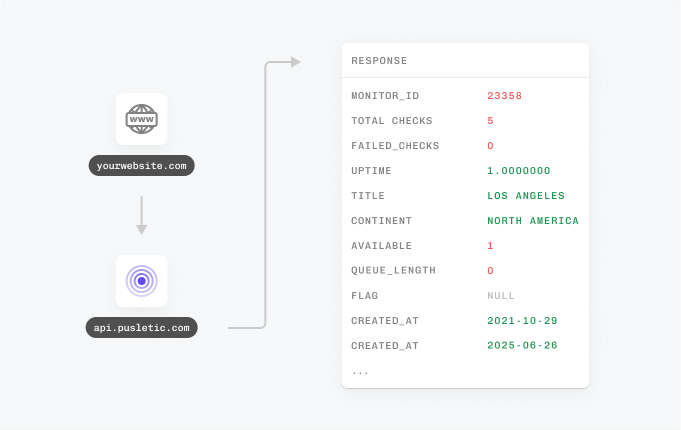
    With Pulsetic's API, you've got complete control: you can add custom statistics, monitors & automations, create bespoke rules and maintain granular control over who can access or modify monitoring information. Best suited for developers in scale-up or large enterprises.

  • Multi-page and multi-feature monitoring

    Multi-page and multi-feature monitoring

    Easily monitor multiple pages; track any keyword in body text, a product listing, or a form field. Keyword absence alerts, multi-location monitoring, and historical tracking help you understand trends and improve your website's performance and reliability.

How Does the Keyword Monitor Work?

You don't need to be technical to use Pulsetic; we've made it quick and simple for everyone.

  • Sign up for a free Pulsetic account and click «add monitor».

  • Add the keywords you want to monitor.

  • Get automated notifications whenever your keywords appear or disappear.

  • For Webmasters

    Monitor key pages for missing keywords or functionality issues and keep your website running smoothly.

  • For Ecommerce Managers

    Stay on top of product availability and instantly update your store when stock levels change.

  • For Marketing Teams

    Make sure business-critical content like landing pages are always visible and working as intended.

  • For Developers

    Quickly identify issues with embedded tools or forms to make sure they can meet high demand.

  • Bring in your whole team.

    Need access for more than one person? Pulsetic is for you. Easily manage access controls with specific rights and permissions for individual users, so you can collaborate without compromising on security.

  • Team access
  • API
  • Connect your API for even more flexibility.

    With Pulsetic’s API, you’ve got complete control: you can add custom statistics, monitors & automations, create bespoke rules and maintain granular control over who can access or modify monitoring information. Best suited for developers in scale-up or large enterprises.

FAQ: Keyword Monitoring

  • What is keyword monitoring on web pages?

    It's a check on whether specific words or phrases show up in a page's HTML. You pick the terms that matter, and the monitor watches whether they're still there. If something gets edited without your knowledge, or a line of content quietly drops out, you find out.

  • How does keyword monitoring work?

    On a set schedule, the tool pulls the page's HTML and looks for the keywords you've listed. Are they present? Are they gone? When the answer doesn't match what you expected, you get an alert.

  • Why is keyword monitoring important?

    Plenty can go wrong without breaking the site outright. A price gets overwritten, a product flips to "sold out", or a tampered page slips through unnoticed. Watching the right keywords catches those moments and keeps the information your visitors see accurate.

  • Can keyword monitoring detect changes in dynamic content?

    By default, it reads the static HTML that the server sends back. When a page builds its content with JavaScript after load, that text isn't in the raw HTML, so you'll need some extra configuration to track it.

  • How can I set up keyword monitoring for my website?

    Point a monitoring service at the URL you care about and tell it which keywords to watch. From there it does the rest, pinging you whenever one of those terms appears where it shouldn't or vanishes from where it should be.

  • What types of alerts are available for keyword monitoring?

    Take your pick: email, SMS, or a voice call when something needs your attention right away. There are also integrations with the tools teams already live in, like Slack, Zapier, and Discord, so the alert lands wherever you'll actually see it.

  • How frequently does keyword monitoring check for changes?

    That's up to you. Most services let you set the interval, anywhere from every few minutes for pages you watch closely to a once-a-day pass for ones that rarely change.

  • Can keyword monitoring be used for non-website content?

    Yes. If a web page or online document is publicly reachable and you need to confirm that certain text is there (or isn't), it's fair game for monitoring.