-
Need a Statuscake
alternative?Try Pulsetic. Same features, lower price.
No credit
card required.
$HTTP_PROTOCOL = (isset($_SERVER['HTTPS']) && ($_SERVER['HTTPS'] == 'on' || $_SERVER['HTTPS'] == 1)) || (isset($_SERVER['HTTP_X_FORWARDED_PROTO']) && $_SERVER['HTTP_X_FORWARDED_PROTO'] == 'https') ? 'https://' : 'http://'; $SITE_URL = $HTTP_PROTOCOL . $_SERVER['SERVER_NAME'] . '/'; ?>
Try Pulsetic. Same features, lower price.
Think about the last time your website went down. What if you’d never found out about it? You could have lost your all-important brand trust - and customers for life. You need to be the first to know.
That’s why Pulsetic monitors your uptime from 15 locations around the world, giving you and your customers beautiful, real-time updates in every language.
But there’s another reason people looking for a Statuscake alternative come to Pulsetic: the functionality you get for your money.
Let’s compare the two.
Beautiful status badges
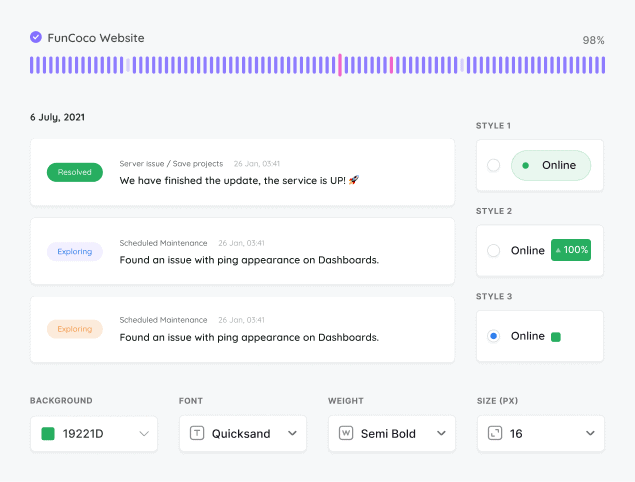
Unlike Statuscake, Pulsetic gives you white labeled badges showing your service availability in real time - on any page you like. You can customize your badge using your brand colors, fonts, symbols, text, and backgrounds. And if you need more freedom to make it yours, you can use Custom CSS instead.
30 second uptime checks
On the cheapest paid plan, Statuscake checks things are OK every minute. With Pulsetic, you can know about an incident within 30 seconds, for a fraction of the cost. If you want to, though, you can also space out the intervals between checks.
Support for every language
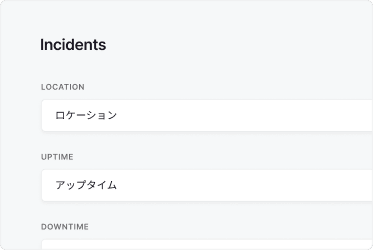
Statuscake works in English - and only English. The world’s 6 billion people who don’t speak English need a Statuscake alternative. Pulsetic, on the other hand, supports every language on earth: from Spanish to Swahili. So wherever your customers are, you can let them know what’s happening.
“Pulsetic helps us monitor all of our websites and webapps over at Pairing.dev. Before we used it, we had no idea how often services (e.g. heroku) were offline. Now we have complete control over it.
Also, what helps is the keyword feature. That helps us from a website being online but showing bogus content (e.g. a static website that compiled wrong). Pulsetic is a great solution with impeccable UX. Super easy to use and does the job well.”
Till Carlos
Founder & Managing Director, Pairing.dev
With Statuscake, you need two plans: one for your uptime monitoring, and a second plan for your status pages. That makes Pulsetic better value for money. You’ll get both features within one plan, for a lower overall price.
Free plans
Statuscake comes with a free plan for uptime monitoring; it includes 10 monitors and tests every 5 minutes. But to publish the status pages you need to build trust in your brand, there isn’t a free option; the cheapest plan is $19.99/month. You get 1 status page and updates for 300 subscribers.
Although Pulsetic’s free plan doesn’t include subscriber updates, it does include 10 monitors and unlimited status pages.
Solo plan
As an alternative to Statuscake, on Pulsetic’s Solo plan ($9/month), you can also run tests every minute, monitor 10 websites or services, and white label your status pages.
The big difference is the price; a similar plan with Statuscake costs $75/month when you add together the costs of your status page and your monitoring - while offering only 50% more monitors and subscriber updates. Overall, that makes Pulsetic’s solo plan better value for money.
Team plan
If you need to know what’s happening by voice call, Pulsetic’s Team plan is the best Statuscake alternative. Even the $330/month Pro plan on Statuscake doesn’t offer voice call alerts.
Pulsetic Team, on the other hand, gives you 100 credits for SMS and voice call alerts, as well as 5,000 subscriber notifications - and it’s just $19/month.
StatusCake
Free plan / trial
Free Plan
7 days
Price (USD/mo)
$9
$24.49
Monitoring
Check time
30 sec
60 sec
Choice of regional data centers
✕
SSL monitoring
Keyword monitoring
Ping / ICMP monitoring
Port monitoring
TCP monitoring
Domain monitoring
Cron / heartbeat monitoring
Custom HTTP requests
Customized responses
API
MCP server
✕
n8n integration
✕
Monitoring data retention
Up to 5 yr
6 yr
Status Pages
Incident updates
Status updates for subscribers via email
Maintenance windows
Status badges
✕
Customized domain
Customized colors
Customized logo
Remove branding
Customized status page layout
CSS customization
Custom email sender & templates
✕
AI writing assistant
✕
Page translations
✕
Password-protected status page
Notifications
Email alerts
SMS alerts
Phone call alerts
Slack alerts
MS teams alerts
Discord alerts
Telegram alerts
Mattermost alerts
Webhooks alerts
Zapier alerts
Twilio alerts
✕
Datadog integration
Integration with SIGNL4
✕
Analytics
See response times
Response time by location
✕
Custom date range reports
Scheduled email reports
Security
Two-factor authentication
Single Sign-On (SAML)
Role-based access
Support
Chat
Human Support
AI Support
✕
Helpdesk Articles
Email Support
Comparison based on publicly available information as of June 2026. Features and pricing change frequently, so please verify current details on each provider’s website.
See where your website is loading slowly
We’ll check your website response times from different locations around the world, so you know if there’s an issue in a particular region.
Alerts wherever you want them
Pulsetic lets you know the moment your website is down, through Slack, Telegram groups, Webhooks, email, SMS or voice call.
Never let your SSL expire again
We’ll let you know when it’s time to update your SSL certificate - so you can renew it before customers are seeing error messages.
2-minute setup · Cancel any time
No credit card needed
StatusCake has a free plan, but it is limited: you get 10 uptime monitors, slow check intervals of 5 minutes at best, with faster checks reserved for paid tiers, and alerts only through integrations. Pulsetic also offers a free plan, and it includes status pages so you can show your uptime publicly without paying. If you need faster checks or subscriber notifications, you will eventually need a paid plan on either tool.
On StatusCake's free plan, checks run no faster than every 5 minutes, and you have to reach the Business tier (around EUR 58 to 70 per month) to get 30-second checks. Pulsetic runs 30-second checks and starts at just $9 per month, so you catch outages sooner without paying for the top tier. Faster checks mean shorter time-to-detection when something goes down.
StatusCake's cheapest paid plan, Superior, is EUR 16.66 per month billed annually (about EUR 19.99 monthly, roughly $24), and the Business plan runs around EUR 58 to 70 per month. There is a 7-day free trial on the paid plans with no credit card required. Pulsetic's paid plans start at $9 per month, which is a lower entry point while still including status pages and 30-second checks.
Pulsetic covers the same core jobs as StatusCake, uptime monitoring plus public status pages, but starts at $9 per month with 30-second checks and a usable free plan. It monitors HTTP(S), SSL, keyword, ping or ICMP, port, TCP, domains, and cron or heartbeat endpoints, and connects to many alert integrations. You also get customizable status pages with subscriber notifications and embeddable status badges, so it works as a complete monitoring and communication setup.
StatusCake's full status page features, including subscriber notifications by email, SMS, and webhook, are geared toward its paid plans rather than the free tier. Pulsetic includes status pages on its plans, with subscriber notifications and status badges you can embed on your own website. That makes it easy to keep customers informed during incidents without jumping to an expensive tier.
The safe approach is to add the same URLs to Pulsetic and run it alongside StatusCake for a week or two using the same or a faster check interval, then turn StatusCake off once you trust the results. Recreate your alerts in Pulsetic for the channels you use, and rebuild your status page there. Since Pulsetic supports HTTP(S), SSL, keyword, ping, port, TCP, domain, and cron or heartbeat checks, most StatusCake monitors map over directly.
Pulsetic monitors HTTP(S) websites, SSL certificates, keyword presence, ping or ICMP, ports, TCP, domains, and cron or heartbeat jobs, covering the common check types people rely on StatusCake for. Checks run as often as every 30 seconds, and you can route alerts through many integrations. On top of monitoring, you get status pages with subscriber notifications and status badges, all from $9 per month or on the free plan.
Yes. Pulsetic lets you publish your status page on a custom domain and brand it as your own, so it looks like a native part of your website rather than a third-party page. You can add a status badge to your website and let visitors subscribe for incident updates. On StatusCake, the more advanced status page and subscriber features sit on higher paid tiers.
Stay online, all the time, with Pulsetic's uptime prime.
By Designmodo
Designmodo Inc. 169 Madison Ave, #79627, New York, NY 10016, United States
Copyright © 2010-2026