SLA Monitoring for Websites and APIs

Pulsetic measures the uptime you actually deliver, from 15 locations worldwide. Set your availability target, get alerted while there’s still time to react, and have the report ready when someone asks for proof.

* No credit card required

Made for You

  • Know the uptime you actually deliver

    Every check from every location is recorded, so your uptime percentage is a fact, not an estimate. Downtime is counted in seconds with timestamps, which is exactly the granularity an SLA conversation needs.

  • Hear about risk before the SLA does

    Alerts reach you by email, SMS, phone call, Telegram, Slack, Discord or Microsoft Teams the moment a check fails. Multi-location checking keeps false alarms from burning your downtime budget on paper.

  • Prove compliance without a spreadsheet

    Uptime history, incident logs, reports over the exact date range your contract uses, and scheduled email reports that send themselves. When a customer asks how last quarter went, the answer is already written.

"Tens of thousands of business owners from around the world rely on our service, and Pulsetic is the best platform there is to ensure we communicate any downtimes clearly and swiftly to our customers to avoid panic and disappointment. Getting setup on Pulsetic not only been smooth and easy but super joyful too, the design is stunning and customisable unlike any other monitoring platform we’ve used."

Leo Bassam
Leo Bassam

Founder, CEO at Plutio

"There's an easy way for you to monitor your online project. After all the hard work you have put into going live, you want to make sure that things keep running smoothly while you focus on the next project."

Chris Kalmar
Chris Kalmar

Founder at nineLemon

"Pulsetic is super easy to use and fast. The UI is very simple and clean, and it offers all the right features. The status page design is also great, and we really liked the fact that we could set up alert notifications in multiple channels."

Akis Laopodis
Akis Laopodis

Founder of HelpfulDocs

"The monitoring tool we've been waiting for. Super easy to set up monitoring, customizable status page design, and access to notifications across Slack, email and SMS. Pulsetic is awesome."

Andrei Negrau
Andrei Negrau

CEO at Cartloop.io

"Pulsetic helps us monitor all of our websites and webapps over at Pairing.dev. Before we used it, we had no idea how often services (e.g. heroku) were offline. Now we have complete control over it."

Till Carlos
Till Carlos

Founder at Pairing.dev

"Using Pulsetic is a big win for us! Our dev team can now deliver faster, with zero time spent monitoring our website uptime. Plus the interface is great and analytics proper."

Razvan Popescu
Razvan Popescu

Head of Marketing at AbstractAPI

What You Can Track for an SLA

  • Uptime percentage

    The headline number behind every SLA, computed from real checks across websites, APIs and services rather than your hosting provider’s word.

  • Downtime totals

    Outage time counted in seconds per day, month or contract period, so you always know how much of the downtime budget is left.

  • Response times by region

    Slow is the new down. Per-location response times reveal regional degradation that a single-region check would never notice.

  • Incident history

    Every outage logged with start, end and duration: the raw material for postmortems, service credit calculations and honest customer updates.

  • Scheduled reports

    Uptime reports over custom date ranges, plus scheduled email reports, so monthly SLA reviews stop being a manual chore.

  • Published uptime

    Status pages and badges put your live uptime where customers can see it, which answers most SLA questions before they are asked.

Not sure what 99.9% really allows? Convert any target into allowed downtime with the free uptime SLA calculator.

How Does SLA Monitoring Work?

You don’t need to be technical to use Pulsetic; we’ve made it quick and simple for everyone.

  • Sign up free and add monitors for the websites and services your SLA covers.

  • Pick your target. The SLA calculator shows that 99.9% means about 43 minutes of downtime a month.

  • Get alerted on every incident, and pull the uptime report whenever a customer asks.

  • For DevOps Teams

    Track error budgets against real multi-location uptime data and catch incidents before they eat the SLA.

  • For IT Managers

    Report delivered availability to stakeholders with scheduled uptime reports instead of hand-built spreadsheets.

  • For Business Owners

    Know whether you are keeping the promises in your contracts, with the numbers ready when a customer asks.

  • For Startup Teams

    Offer a credible SLA to enterprise customers without building a monitoring and reporting stack first.

  • Bring in your whole team.

    Need access for more than one person? Pulsetic is for you. Easily manage access controls with specific rights and permissions for individual users, so you can collaborate without compromising on security.

  • Team access
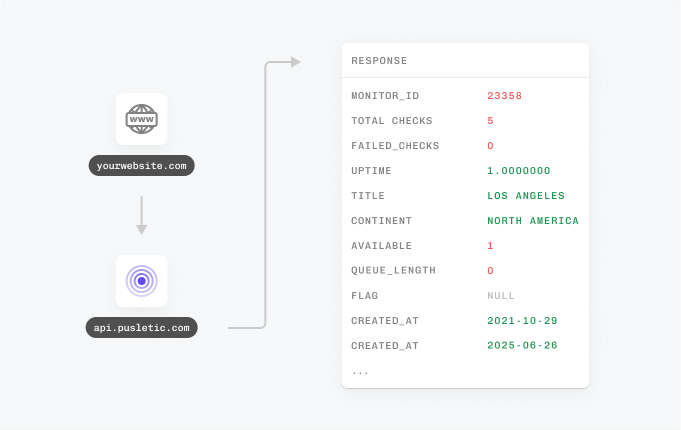
  • API
  • Connect your API for even more flexibility.

    With Pulsetic’s API, you’ve got complete control: you can add custom statistics, monitors & automations, create bespoke rules and maintain granular control over who can access or modify monitoring information. Best suited for developers in scale-up or large enterprises.

FAQ: SLA Monitoring

  • What is SLA monitoring?

    SLA monitoring measures the availability you actually deliver and compares it against the level you promised in a service level agreement. It rests on uptime monitoring: regular checks record every outage and its duration, so at the end of the month you know whether you hit 99.9% or owe someone an explanation, with the data to back it up.

  • What is the difference between SLA, SLO and SLI?

    An SLI is the measurement itself, such as uptime percentage or response time. An SLO is the internal target you set for that measurement, like 99.95% uptime. An SLA is the external promise to customers, usually with consequences such as service credits when it is missed. Monitoring supplies the SLI, and the SLI tells you how you are doing against both targets.

  • How much downtime does 99.9% uptime allow?

    About 43 minutes per month, or roughly 8 hours and 46 minutes over a year. Tightening the target to 99.99% shrinks the budget to about 4 minutes a month, and the same 99.99% measured over a week leaves barely a minute. You can convert any target into its allowed downtime with Pulsetic’s free uptime SLA calculator.

  • How does Pulsetic measure uptime?

    Monitors check your websites and endpoints on a schedule you choose, as often as every 30 seconds, from up to 15 locations worldwide. Checking from multiple regions separates real outages from local network blips, and every incident is recorded with timestamps and duration, so your uptime percentage is built from complete data rather than estimates.

  • Can I get reports to prove SLA compliance?

    Yes. Pulsetic keeps your uptime history with response times and incident logs, supports reports over custom date ranges that match your billing or contract periods, and can deliver scheduled uptime reports by email, so the numbers arrive before anyone has to ask for them.

  • Can I share my uptime with customers?

    Yes. Pulsetic status pages publish your live status and uptime history on your own domain with your branding, and visitors can subscribe to incident updates on paid plans. Embeddable status badges put a live uptime number on any page you like, which is often the simplest answer to an SLA question.

  • What uptime target should I promise in an SLA?

    Promise what you can sustain, not what sounds impressive. Each extra nine roughly multiplies the difficulty: 99.9% leaves room for normal operations, while 99.99% demands redundancy everywhere and leaves about 4 minutes a month for everything that can go wrong. A common approach is to measure your real uptime for a few months first, then set the SLA a comfortable margin below what you observe.

  • My hosting provider already has an SLA. Do I still need monitoring?

    Yes, for two reasons. Your host’s SLA covers their infrastructure, not your application: a bad deploy, an expired certificate or a crashed process is downtime for your users that the host’s SLA never sees. And if you offer an SLA to your own customers, you need independent measurements of what they experienced, not your provider’s numbers about their servers.

Hey there 👋  Friends from designmodo are here to help!