• Need an Umami underline
    alternative?

    Try Pulsetic. Real User Monitoring with Core Web Vitals on by default, uptime checks and status pages from $9. A free plan gets you started.

    Learn why...

    No credit
    card required.

  • Looking for an Umami alternative?

Pulsetic vs Umami: the breakdown

Credit where due: Umami is excellent and generous. It is open source under the MIT license, free and unlimited when you self-host, cookieless by design, and every tier includes goals, custom events, funnels, retention reports, UTM and revenue tracking. Since v3.1 it even offers an opt-in Core Web Vitals report.

The honest gaps are narrower but real. Vitals are an opt-in extra, and a Web Vitals report only: no per-resource timing, no error tracking. And nothing in Umami watches your website from outside: no uptime checks, no alerting, no status pages. An analytics dashboard cannot page you at 3am.

That’s why people searching for an Umami alternative land on Pulsetic: performance data on by default, with JS error tracking built in, plus uptime checks from outside as often as every 30 seconds, alerts and status pages, all hosted with no server to maintain.

Let’s compare the two.

  • Vitals by default, not opt-in

    Vitals by default, not opt-in

    Umami added a Core Web Vitals report in v3.1, but it is opt-in and vitals-only. Pulsetic collects LCP, CLS, INP and FCP by default, alongside load time percentiles (p50, p75, p95) and JS error tracking.

  • The outside view

    The outside view

    Nothing in Umami checks your website from outside. Pulsetic pings it as often as every 30 seconds from up to 15 regions, and alerts you before customers start asking, by email, webhook, Slack, Teams, Discord, Telegram, SMS, WhatsApp or phone call.

  • Status pages, even on the free plan

    Status pages, even on the free plan

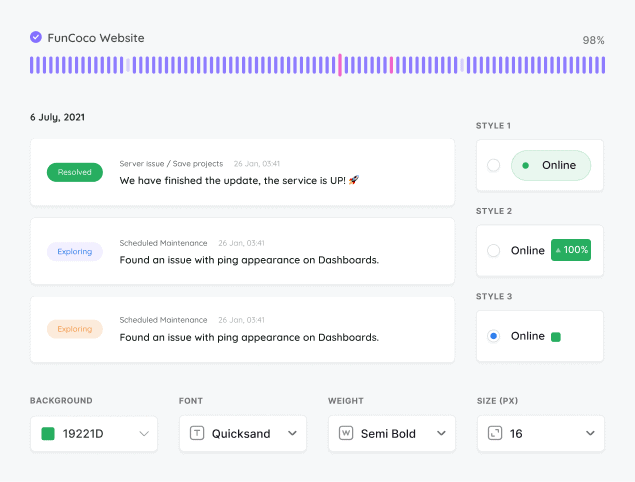
    Pulsetic includes status pages on a domain you own, with customization, subscriber emails, incident updates and maintenance windows. With Umami you would still need a second tool for the whole uptime side of the job.

  • “Pulsetic has transformed my website monitoring experience with its intuitive interface and real-time tracking capabilities. I love how effortlessly I can keep tabs on my site’s performance, ensuring everything runs smoothly!”

  • Koen Kanters

    Koen Kanters

    Senior Software Engineer at ASML

Pricing: Pulsetic vs Umami

  • Free plans

    Umami’s free Hobby plan covers 100,000 events a month on 1 website, with 6-month retention, no API access and community support. Pulsetic’s free plan includes 10 monitors, status pages and 1,000 RUM pageviews a month, commercial use allowed.

  • Paid plans

    Umami Cloud is $20 a month for 1 million events and 20 websites, $200 for Business with session replays. Pulsetic’s alternative to Umami starts at $9 for 10,000 RUM pageviews plus uptime monitors and status pages.

  • Self-hosting trade-off

    Self-hosted Umami is free and unlimited, but it is your Node.js and PostgreSQL server to run, patch and back up. Pulsetic is hosted only: nothing to maintain, and uptime checks from up to 15 external regions are not something your own box can do.

Feature comparison

PulseticPulsetic

Umami

Free plan / trial

Free Plan

Free Plan (100k events)

Price (USD/mo)

$9

$20 Cloud; $0 + your server

Monitoring

Check time

30 sec (Team plan)

n/a

Real User Monitoring (RUM)

Web Vitals opt-in

Multi-step browser checks

✕

Choice of regional data centers

n/a

SSL monitoring

✕

Keyword monitoring

✕

Ping / ICMP monitoring

✕

Port monitoring

✕

TCP monitoring

✕

Domain monitoring

✕

Cron / heartbeat monitoring

✕

Custom HTTP requests

✕

Customized responses

✕

Downtime screenshots

✕

Chart annotations

✕

API

Built-in AI assistant (chat)

✕

MCP server

✕

n8n integration

✕

Cloudflare IP allowlisting

n/a

Monitoring data retention

3 mo to 5 yr by plan

n/a

Status Pages

Incident updates

✕

Status updates for subscribers via email

✕

Maintenance windows

✕

Status badges

✕

Customized domain

✕

Customized colors

✕

Customized logo

✕

Remove branding

✕

Customized status page layout

✕

CSS customization

✕

Custom email sender & templates

✕

AI writing assistant

✕

Page translations

✕

Password-protected status page

✕

SSO-protected status page

✕

Notifications

Email alerts

✕

SMS alerts

✕

Phone call alerts

✕

WhatsApp alerts

✕

Slack alerts

✕

MS teams alerts

✕

Discord alerts

✕

Telegram alerts

✕

Mattermost alerts

✕

Webhooks alerts

✕

Zapier alerts

✕

Twilio alerts

✕

Datadog integration

✕

Integration with SIGNL4

✕

Analytics

See response times

n/a

Response time by location

n/a

Custom date range reports

Scheduled email reports

Web Analytics & RUM

Cookieless tracking

Core Web Vitals (field data)

Opt-in

Load time percentiles (p50/p75/p95)

Web Vitals only

JS error tracking

✕

Realtime visitors

Traffic breakdowns (pages, geo, devices)

Goals / custom events

✕

Analytics data retention

3 mo to 5 yr by plan

6 mo to 5 yr by plan

Self-hostable

✕

Security

Two-factor authentication

✕

Single Sign-On (SAML)

Role-based access

Support

Chat

Human Support

AI Support

✕

Helpdesk Articles

Email Support

Comparison based on publicly available information as of October 2026. Features and pricing change frequently, so please verify current details on each provider’s website.

Trusted by teams at companies around the world

  • image/svg+xml
  • image/svg+xml Mercedes-Benz logo
  • image/svg+xml
  • image/svg+xml

And there’s more in Pulsetic’s free plan…

  • See where your website is loading slowly

    See where your website is loading slowly

    We’ll check your website’s response times from different locations around the world, so you know if there’s an issue in a particular region.

  • Alerts wherever you want them

    Alerts wherever you want them

    When your website fails a check and a second location confirms it, Pulsetic alerts you by email or webhook.

  • Never let your SSL expire again

    Never let your SSL expire again

    We’ll let you know when it’s time to update your SSL certificate, so you can renew it before customers see error messages.

Frequently asked questions

  • What is Umami best at?

    Generous, open-source web analytics. Self-hosting is free and unlimited under the MIT license, the script is cookieless, and every tier includes goals, custom events, funnels, retention reports, UTM and revenue tracking. Since v3.1 it even offers an opt-in Core Web Vitals report. Pulsetic focuses on a different question: not what happened on your website, but how fast it was and whether it was up at all.

  • How much does Umami cost?

    Self-hosting is free and unlimited; you provide the Node.js and PostgreSQL server and keep it running. Umami Cloud has a free Hobby plan (100,000 events a month, 1 website, 6-month retention, no API access), Pro at $20 a month for 1 million events and 20 websites, and Business at $200 with 5-year retention and session replays. Pulsetic starts free, and paid plans start at $9 a month with 10,000 RUM pageviews, 10 uptime monitors and status pages.

  • Does Umami show Core Web Vitals?

    Yes, since v3.1 (April 2026): an opt-in report you enable with a data-performance attribute on the script tag, covering LCP, INP, CLS, FCP and TTFB at p50, p75 and p95, per page, device and browser. It is a Web Vitals report only, with no per-resource timing and no error tracking. Pulsetic collects vitals by default, with nothing to enable, and adds load time percentiles and JS error context.

  • Can Umami tell me when my website is down?

    No. Umami has no uptime monitoring, no alerting of any kind and no status pages. During an outage the dashboard just shows traffic dropping. Pulsetic checks your website from outside (as often as every 30 seconds from up to 15 regions) and emails you or fires a webhook when it fails. It can also alert you through Slack, Microsoft Teams, Discord, Telegram, SMS, WhatsApp or a phone call.

  • Is Pulsetic a drop-in replacement for Umami?

    No. Pulsetic does not track goals, custom events, funnels or UTM campaigns, so if your work depends on conversion reporting, keep Umami for it. Both scripts are small and cookieless, so the two run side by side well: Umami for product and marketing questions, Pulsetic for performance and uptime.

  • Does Pulsetic's tracking script use cookies?

    No. Like Umami, Pulsetic sets no cookies and writes nothing to localStorage. Umami counts visitors with a server-side hash that rotates monthly; Pulsetic does not need to count unique visitors at all, so there is no client-side visitor identifier of any kind. The script sends up to two small performance beacons per pageview, with no sampling.

  • Can I self-host Pulsetic like Umami?

    No, Pulsetic is a hosted service only. If self-hosting is a hard requirement, Umami is the right direction. The trade-off runs the other way too: with Pulsetic there is no server to run, patch or back up, and external uptime monitoring from up to 15 regions cannot come from your own box anyway.

  • When should I switch from Umami to Pulsetic?

    When the questions you are asking change: you care less about events and campaigns and more about why the website felt slow, whether Core Web Vitals pass, and who tells you when it goes down. Pulsetic answers those, includes status pages, and has a free plan to start. If you need both sets of answers, the two scripts coexist happily.